CyberDefenders — WireDive Lab Writeup
Comprehensive step-by-step investigation of 5 multi-protocol packet capture traces. Spanning DHCP address allocation, DNS lookups, SMB share exfiltration, Linux reverse shells, enterprise Cisco switching protocols (STP, CDP, HSRP, SNMP, TFTP NVRAM configs), and decrypting HTTPS/HTTP2 traffic via SSL pre-master secret key logs.
37-WireDive.zip (26.5 MB)
Source: C:\CTFS\CyberDefenders\WIRE DIVE LAB
dhcp.pcapng & dns.pcapngDHCP & DNS Protocol Triage
Covering questions 01 through 05 with Wireshark packet stream analysis.
Q1: What IP address is requested by the client?
Open dhcp.pcapng in Wireshark.
Apply the display filter dhcp (or bootp.option.dhcp == 3 for DHCP Requests specifically) to isolate DHCP traffic.
Inspect the DHCP Request packet (Packet 189) where the client requests its allocated IP address.
Expand Dynamic Host Configuration Protocol ➔ Option: (50) Requested IP Address, which shows 192.168.2.244.
dhcp
Q2: What is the transaction ID for the DHCP release?
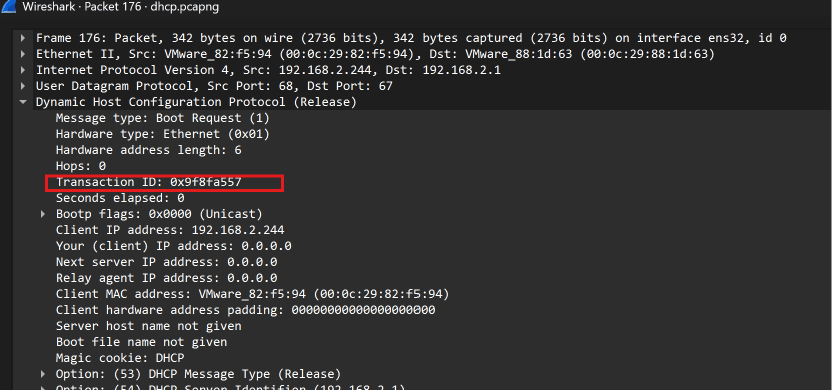
With the dhcp filter active, look at the very first packet in the trace: Packet 176 (DHCP Release).
Click on Packet 176 and expand the Dynamic Host Configuration Protocol (Release) tree in the Packet Details pane.
Locate the Transaction ID field directly under Message/Hardware type: 0x9f8fa557.
dhcp
Q3: What is the MAC address of the client?
In the same DHCP Release packet (Packet 176), inspect the client hardware identification.
In the Dynamic Host Configuration Protocol header, locate the field Client MAC address.
It shows VMware_82:f5:94 (00:0c:29:82:f5:94).
dhcp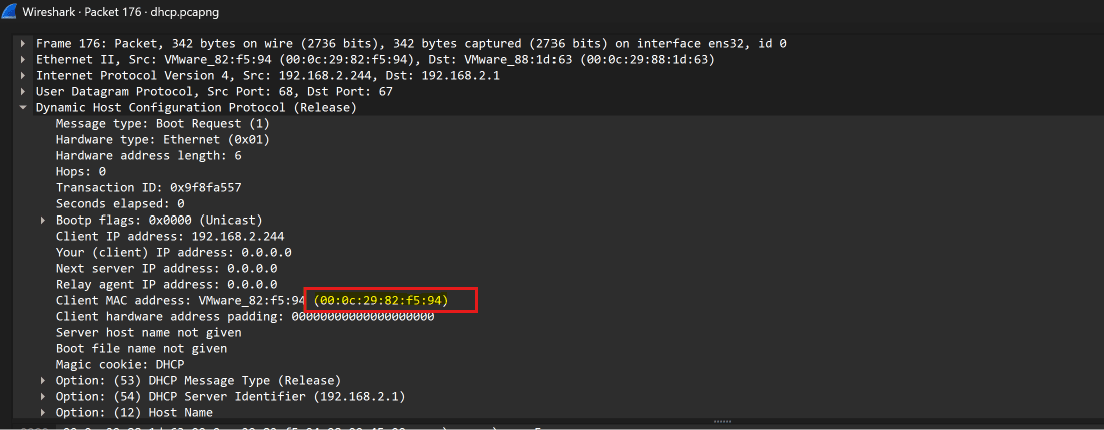
Q4: What is the response for the lookup for flag.fruitinc.xyz?
Switch to the second capture file: dns.pcapng.
Filter for the target domain: dns.qry.name == "flag.fruitinc.xyz" or scan standard queries.
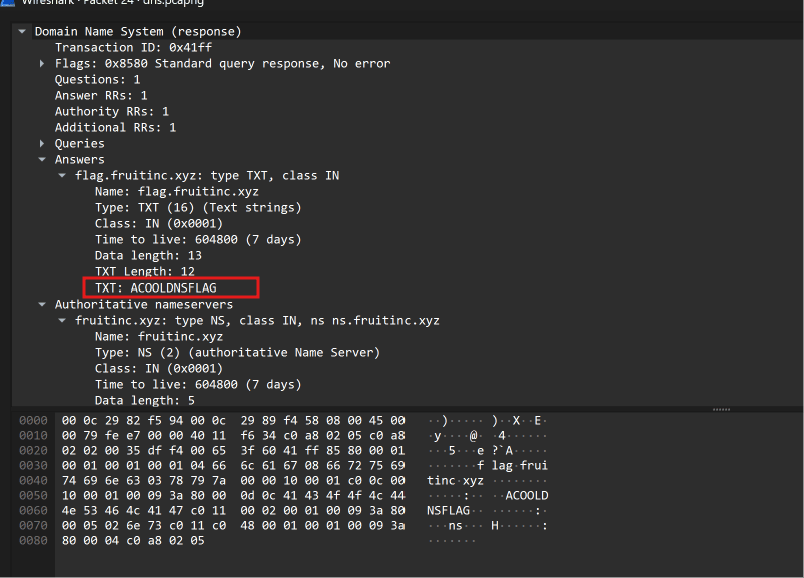
Locate the Standard query response for flag.fruitinc.xyz.
Expand the Answers section of the DNS packet: the TXT record contains acooldnsflag.
dns.qry.name == "flag.fruitinc.xyz"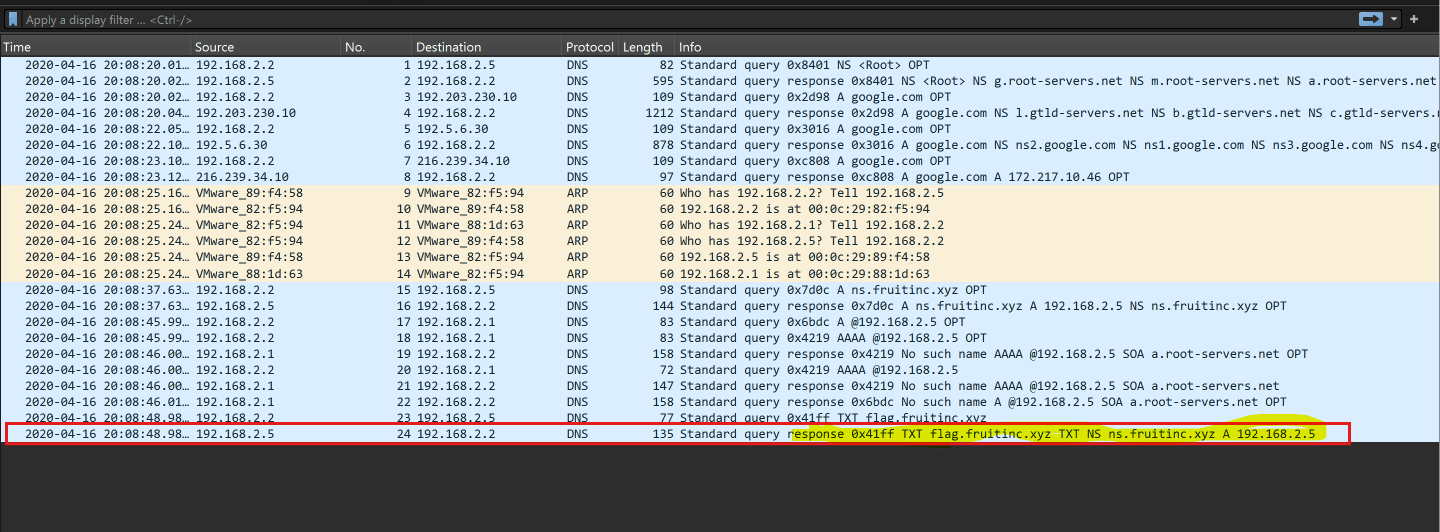
Q5: Which root server responds to the google.com query? Hostname.
Common Pitfall Avoidance: Packet 2 shows a root query, but it is merely requesting the list of root servers (NS <Root>), NOT answering for google.com!
Look right below it at Packet 3: The client sends a query for google.com to destination IP 192.203.230.10.
Look at Packet 4: IP 192.203.230.10 responds to the google.com query by providing a referral pointing to the .com name servers (gtld-servers.net).
Resolving the fixed root server IP 192.203.230.10 (via reverse DNS lookup nslookup 192.203.230.10 or standard IANA root server lists) reveals: e.root-servers.net.
dns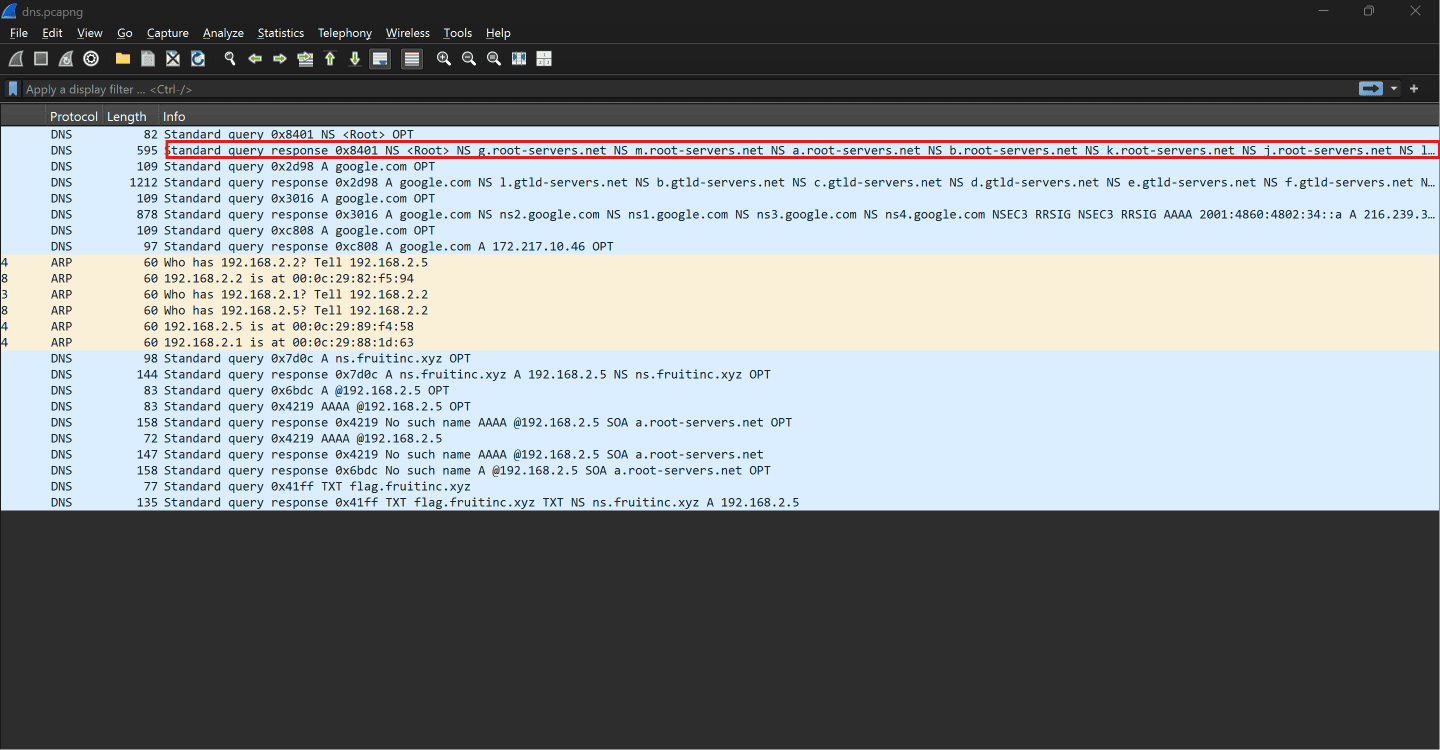
smb.pcapngSMB Shares & Secrets Extraction
Covering questions 06 through 09 with Wireshark packet stream analysis.
Q6: What is the path of the file that is opened?
Switch to the third capture file: smb.pcapng.
To quickly pinpoint file access without manually scrolling through hundreds of packets, apply a filter for SMB2 Create / Open requests: smb2.cmd == 5 or smb2.filename contains "txt".
Inspect the SMB2 Create Request (Packet 147). Under SMB2 (Server Message Block Protocol Version 2) ➔ Create Request (0x05), locate the Filename field: HelloWorld\TradeSecrets.txt.
smb2.filename contains "txt" || smb2.cmd == 5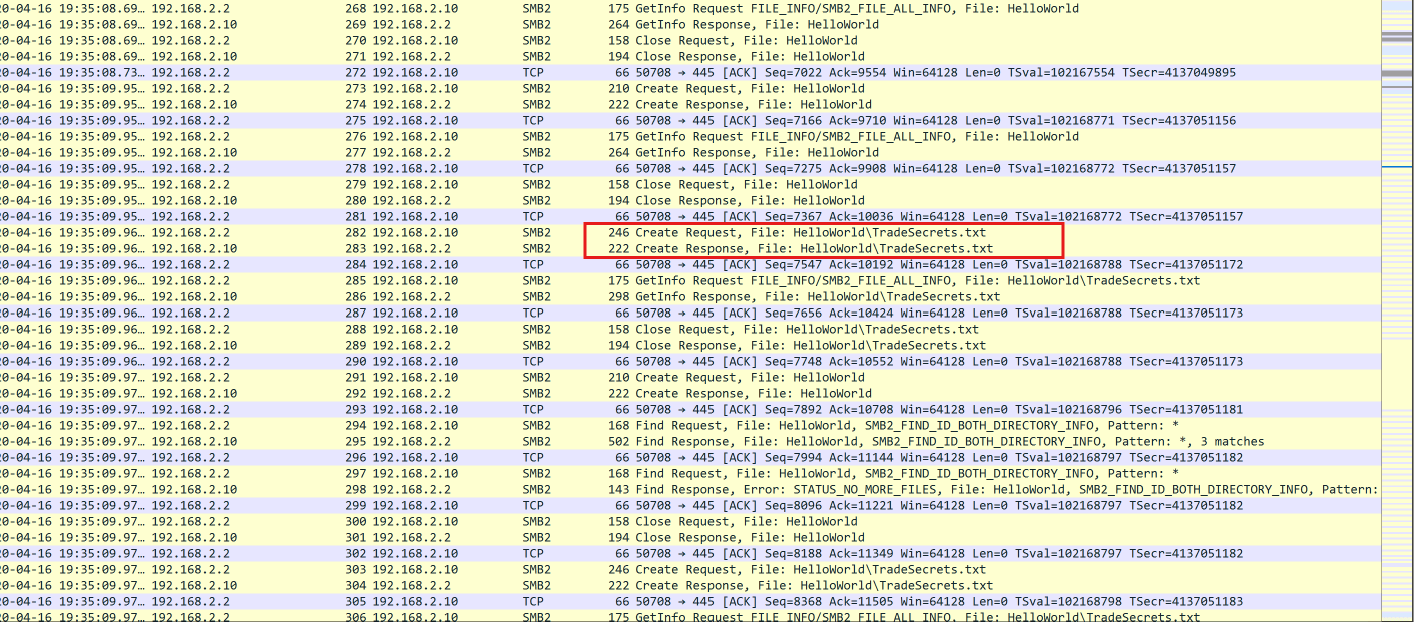
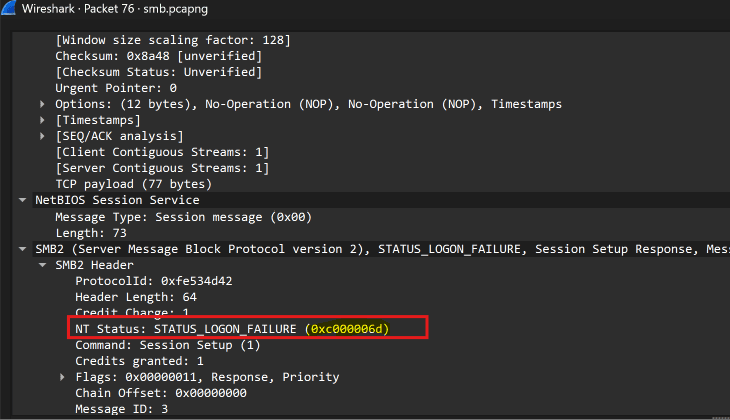
Q7: What was the hex status code when the user SAMBA\jtomato logs in?
Search for user jtomato by filtering: ntlmssp.auth.username == "jtomato" (or press Ctrl+F ➔ String ➔ jtomato).
Wireshark isolates Packet 75: Session Setup Request, NTLMSSP_AUTH, User: SAMBA\jtomato.
The Trap: Packet 75 is a client request and will never contain a status code. The status code is returned by the server in the response!
Double-click the blue generated [Response in: 76] link in the SMB2 Header (or step to Packet 76).
In Packet 76 (Session Setup Response, Error: STATUS_LOGON_FAILURE), expand the SMB2 Header: NT Status: STATUS_LOGON_FAILURE (0xc000006d).
ntlmssp.auth.username == "jtomato"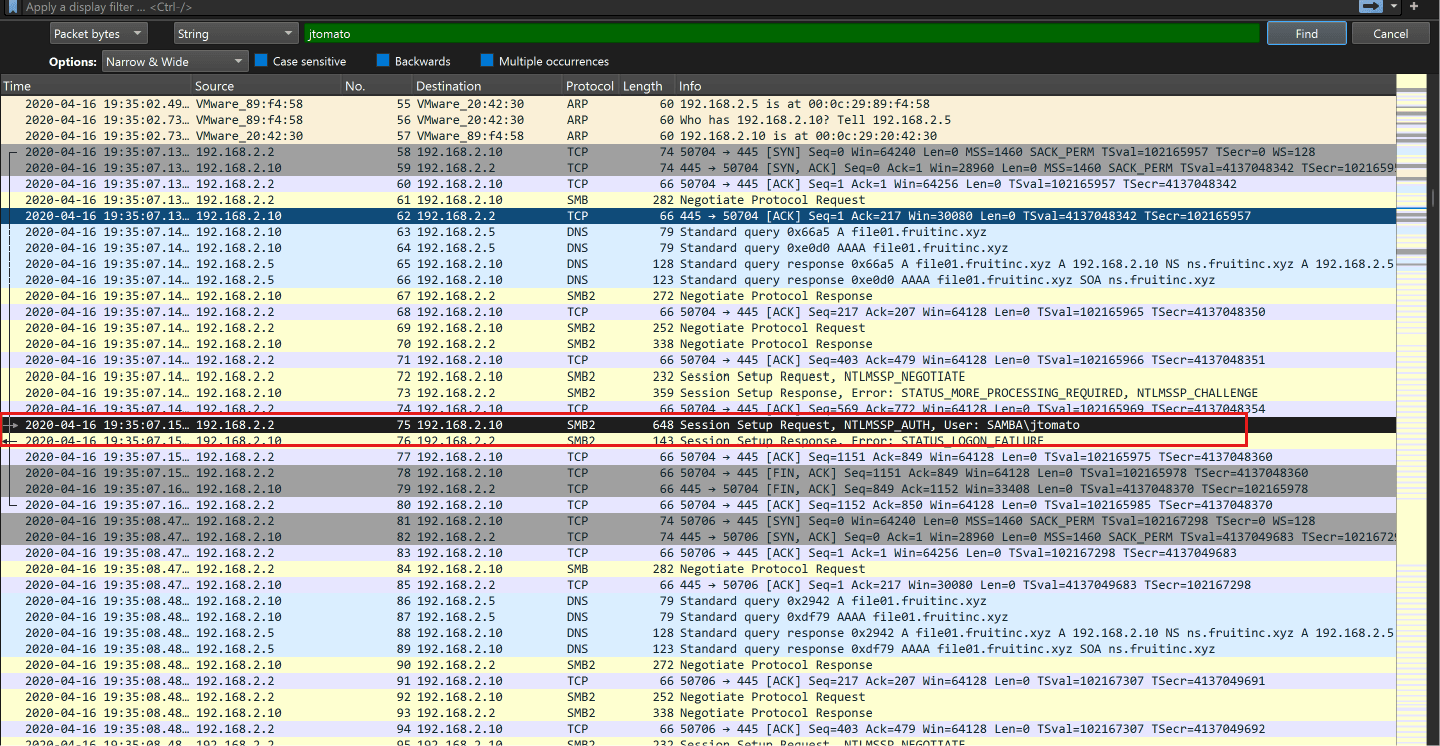
Q8: What is the tree that is being browsed?
In SMB2, connecting to a shared network directory is designated as a Tree Connect. Before a client can browse files, it issues a Tree Connect Request.
Filter specifically for Tree Connect commands: smb2.cmd == 3.
Two Tree Connect requests are observed: Packet 124 connects to \\192.168.2.10\IPC$ (system RPC management), and Packet 133 connects to \\192.168.2.10\public.
Packet 133 is the actual shared filesystem tree where subsequent directory operations and HelloWorld\TradeSecrets.txt reside: \\192.168.2.10\public.
smb2.cmd == 3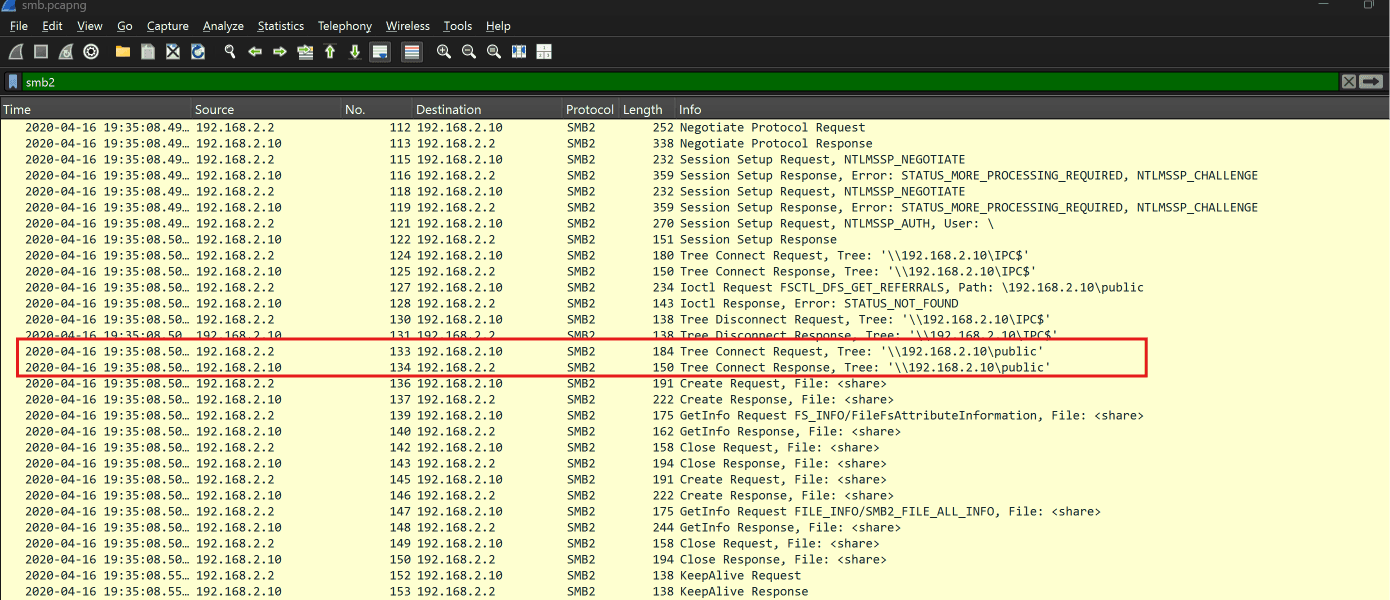
Q9: What is the flag in the file?
We know the client accessed TradeSecrets.txt. To extract its unencrypted contents, use Wireshark's built-in file carver: File ➔ Export Objects ➔ SMB....
Locate \HelloWorld\TradeSecrets.txt (50,166 bytes), select it, and save it to disk.
Open the saved file (which contains the Bee Movie script) and search for flag:
... Order in this court! flag<OneSuperDuperSecret> - You're all thinking ...
*(Alternative method)*: In Wireshark, press Ctrl+F ➔ Packet bytes ➔ String ➔ flag to jump straight to the data frame.
Export SMB Objects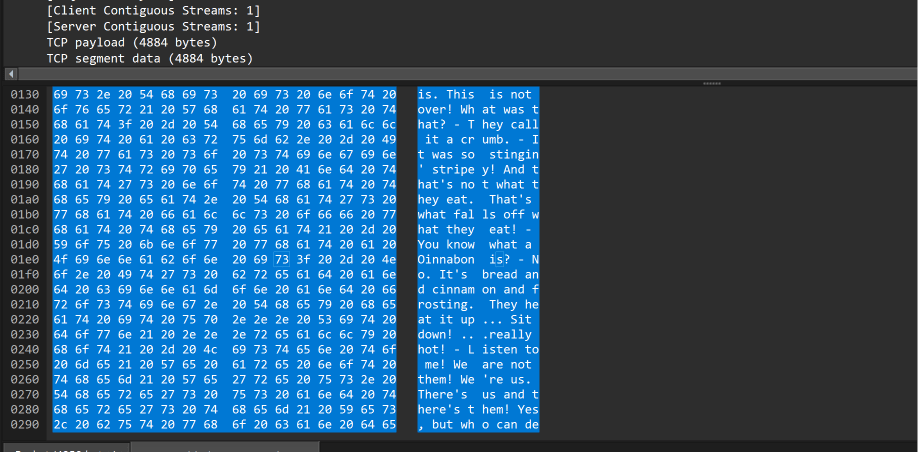
shell.pcapngLinux Reverse Shell & PrivEsc
Covering questions 10 through 16 with Wireshark packet stream analysis.
Q10: What port is the shell listening on?
Switch to shell.pcapng.
Strategy: Rather than analyzing packet-by-packet, follow the TCP Stream to reconstruct the entire interactive terminal session.
Right-click Packet #1 ➔ Follow ➔ TCP Stream (Stream 0).
In Statistics ➔ Conversations ➔ TCP or Packet #1: Client 192.168.2.5:52242 connects to 192.168.2.244:4444.
The Linux shell prompt jtomato@ns01:~$ appears over port 4444.
tcp.port == 4444Q11: What is the port for the second shell?
Stay in the same TCP Stream 0 window and scroll down to observe attacker commands.
Towards the end of the session, the attacker spawns a second netcat listener:
echo "*umR@Q%4V&RC" | sudo -S nc -nvlp 9999 < /etc/passwd
The flag -p 9999 specifies port 9999. Netcat confirms: Listening on [0.0.0.0] (family 0, port 9999).
tcp.port == 9999Q12: What version of netcat is installed?
In Stream 0, examine the package installation command executed prior to spawning the listener:
echo "*umR@Q%4V&RC" | sudo -S apt install netcat
Review the APT package manager output lines:
Get:1 http://us.archive.ubuntu.com/ubuntu bionic/universe amd64 netcat all 1.10-41.1
Unpacking netcat (1.10-41.1) ...
The installed netcat package version string is 1.10-41.1.
Follow TCP Stream 0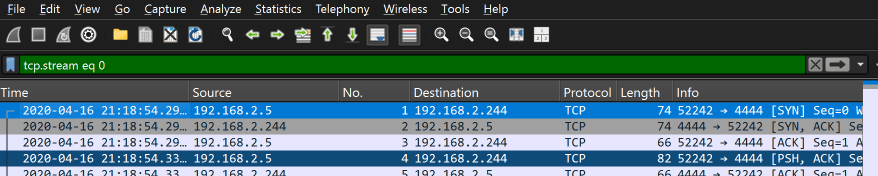
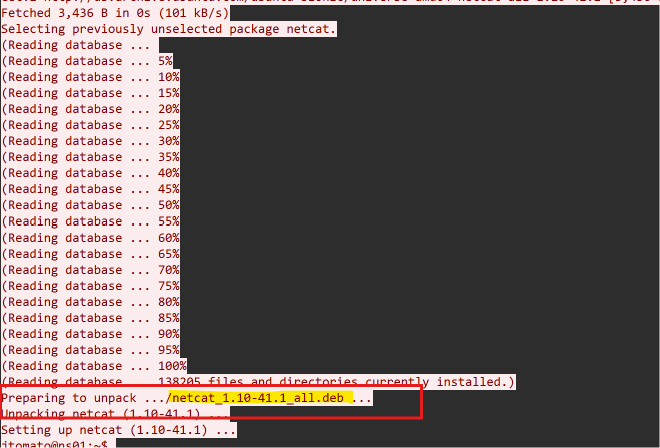
Q13: What file is added to the second shell?
In Stream 0, analyze the command line syntax used to initiate the listener on port 9999:
echo "*umR@Q%4V&RC" | sudo -S nc -nvlp 9999 < /etc/passwd
The input redirection operator < streams the file /etc/passwd directly into netcat for any incoming connection to download.
Follow TCP Stream 0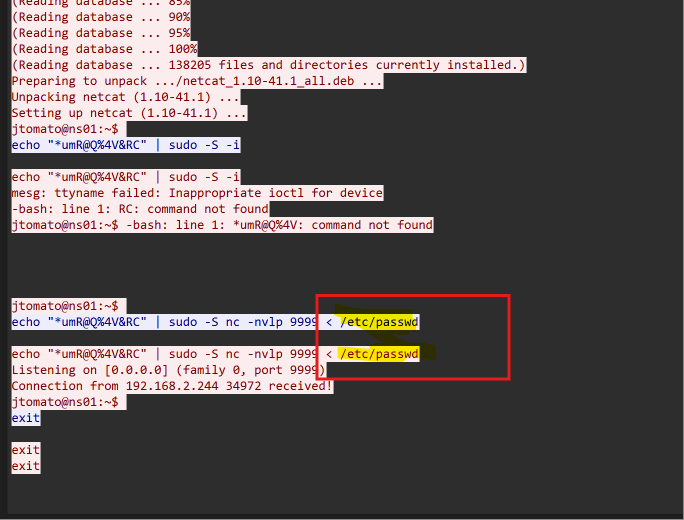
Q14: What password is used to elevate the shell?
Linux privilege escalation in this session is executed via sudo -S (which reads credentials from standard input).
Notice the attacker pipelines their password into sudo across several commands:
echo "*umR@Q%4V&RC" | sudo -S apt update
echo "*umR@Q%4V&RC" | sudo -S apt install netcat
echo "*umR@Q%4V&RC" | sudo -S -i
The password used for elevation is *umR@Q%4V&RC.
Follow TCP Stream 0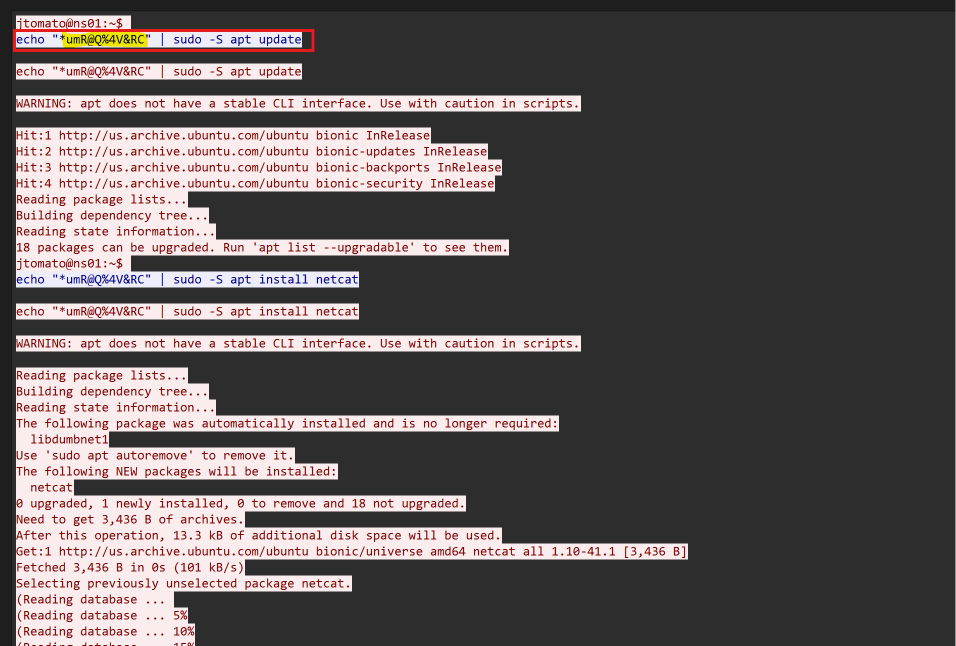
Q15: What is the codename of the target system's OS version?
In Stream 0, examine the output of the apt update command:
Hit:1 http://us.archive.ubuntu.com/ubuntu bionic InRelease
Hit:2 http://us.archive.ubuntu.com/ubuntu bionic-updates InRelease
In Debian/Ubuntu distributions, repository paths reflect the OS release codename (Ubuntu 18.04 LTS is bionic).
Follow TCP Stream 0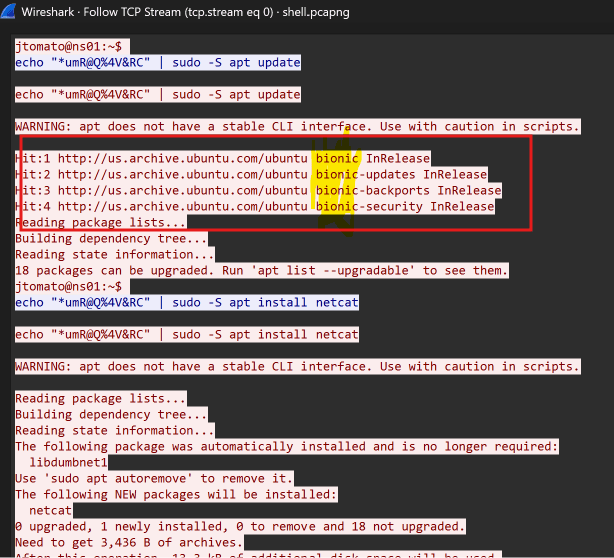
Q16: How many users are on the target system?
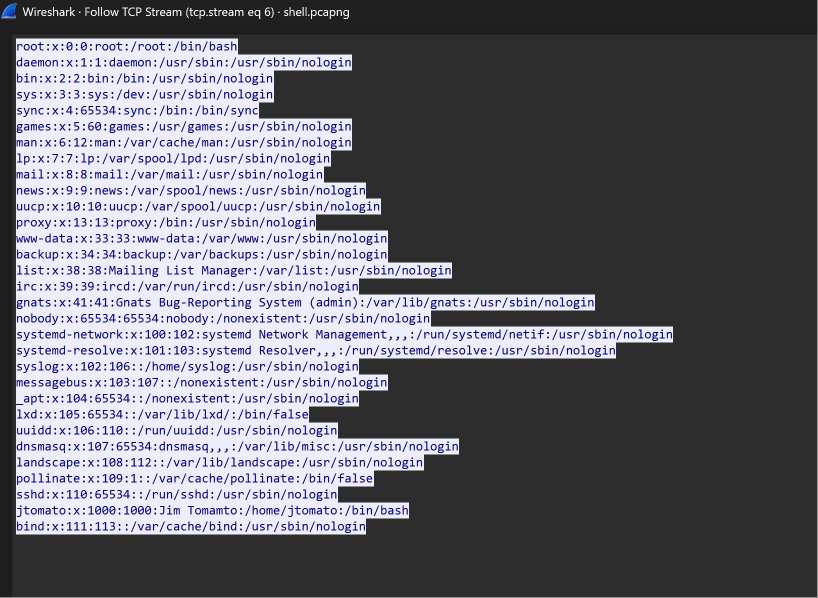
In Q13, we saw /etc/passwd was served over port 9999.
Filter for the second shell traffic: tcp.port == 9999.
Right-click any packet ➔ Follow ➔ TCP Stream (Stream 6).
The complete /etc/passwd file is dumped in plaintext (from root:x:0:0... down to bind:x:111:113...).
Counting the individual user entries line-by-line yields exactly 31 accounts.
tcp.port == 9999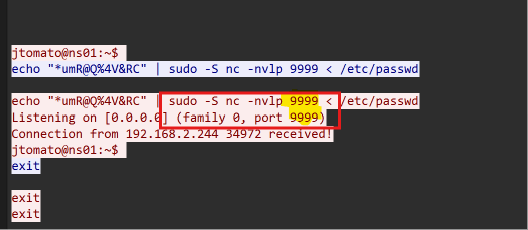
network.pcapngEnterprise Infrastructure & Cisco IOS
Covering questions 17 through 29 with Wireshark packet stream analysis.
Q17: What is the IPv6 NTP server IP?
Switch to the fourth capture file: network.pcapng.
Filter for Network Time Protocol traffic: ntp.
Inspect the IPv6 packets. The external NTP server communicating with the local host is 2003:51:6012:110::dcf7:123.
ntp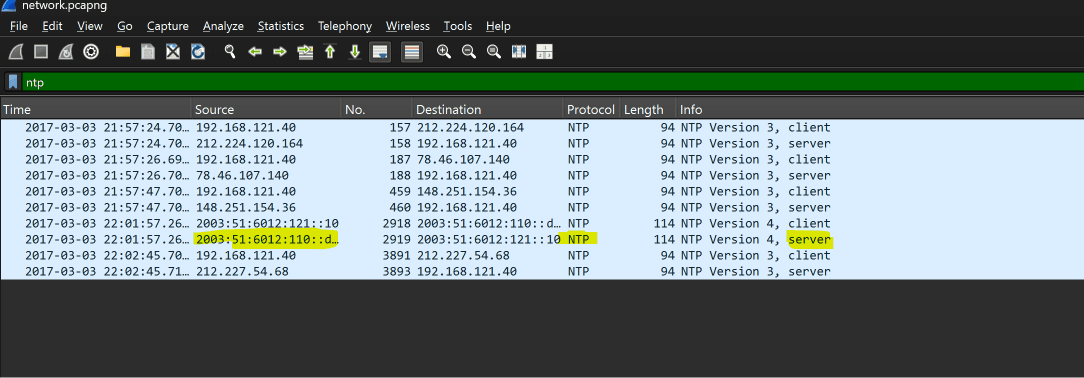

Q18: What is the first IP address that is requested by the DHCP client?
Filter for DHCP traffic: dhcp (or filter specifically for DHCP Request messages: bootp.option.dhcp == 3).
The DHCP DORA handshake proceeds: Discover ➔ Offer ➔ Request ➔ Ack.
Inspect the very first DHCP Request in the trace (Packet 1254).
Expand Dynamic Host Configuration Protocol ➔ Option: (50) Requested IP Address, which shows 192.168.20.11.
bootp.option.dhcp == 3 || dhcpQ19: What is the first authoritative name server returned for the domain that is being queried?
Filter for DNS traffic: dns.
Locate the first DNS query response: Packet 243 (resolving blog.webernetz.net).
In Packet Details, expand the Authoritative nameservers section.
The very first authoritative nameserver record returned is Name Server: ns1.hans.hosteurope.de.
dns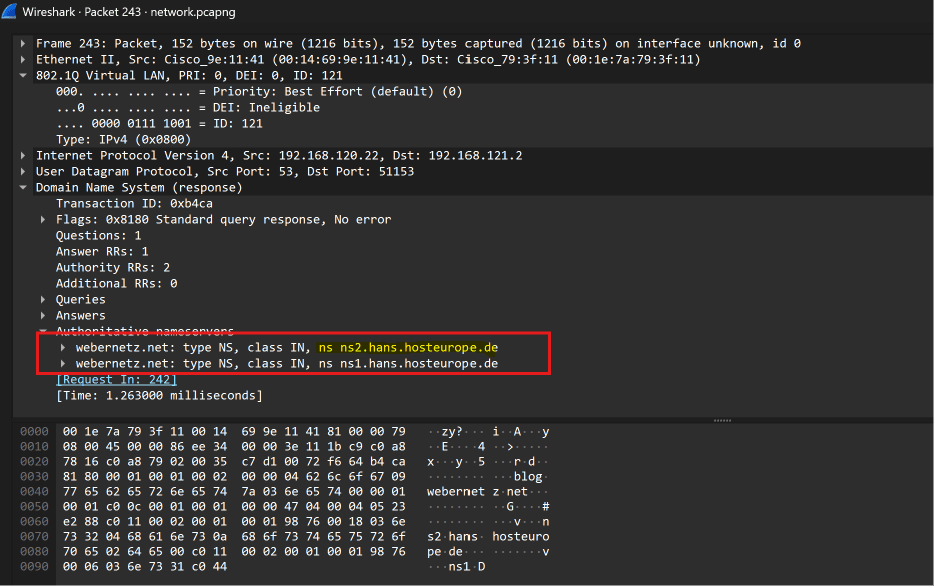
Q20: What is the number of the first VLAN to have a topology change occur?
Spanning Tree Protocol (STP) signals network topology reconfigurations using the Topology Change (TC) bit flag.
Filter for STP BPDUs where the TC bit is active: stp.flags.tc == 1.
Examine the very first packet returned: Packet 42.
In Packet Details, expand the IEEE 802.1Q Virtual LAN header or Spanning Tree Originating VLAN (PVID): it indicates VLAN 20.
stp.flags.tc == 1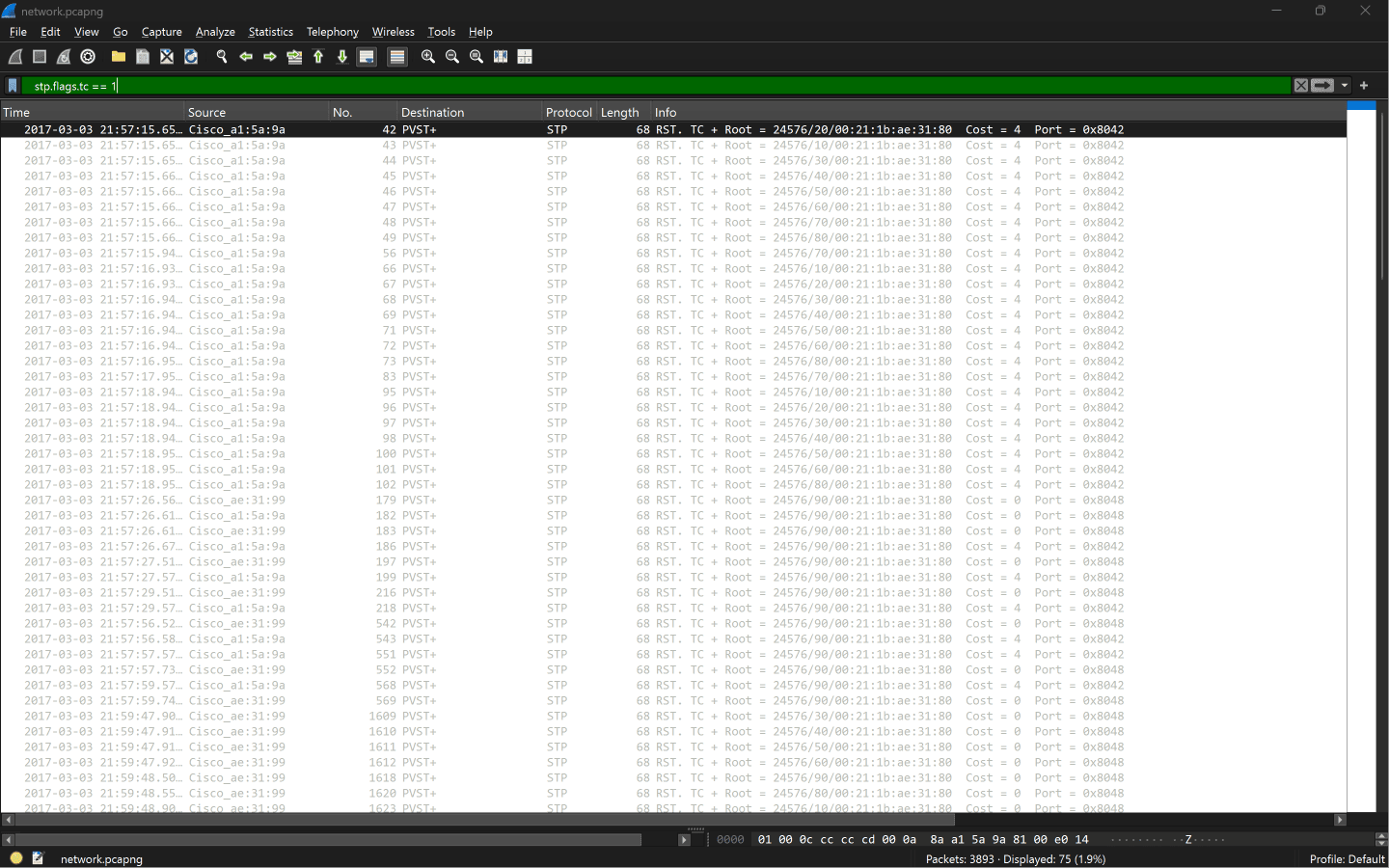
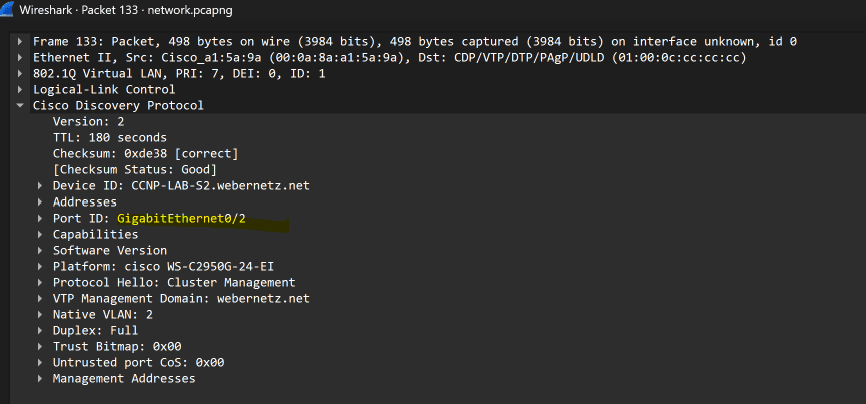
Q21: What is the port for CDP for CCNP-LAB-S2?
Cisco Discovery Protocol (CDP) broadcasts layer-2 neighbor details between Cisco switches and routers.
Filter for CDP packets: cdp.
Locate the announcement from device CCNP-LAB-S2.webernetz.net (Packet 133).
Expand Cisco Discovery Protocol ➔ Port ID: Sent through Interface: GigabitEthernet0/2.
cdp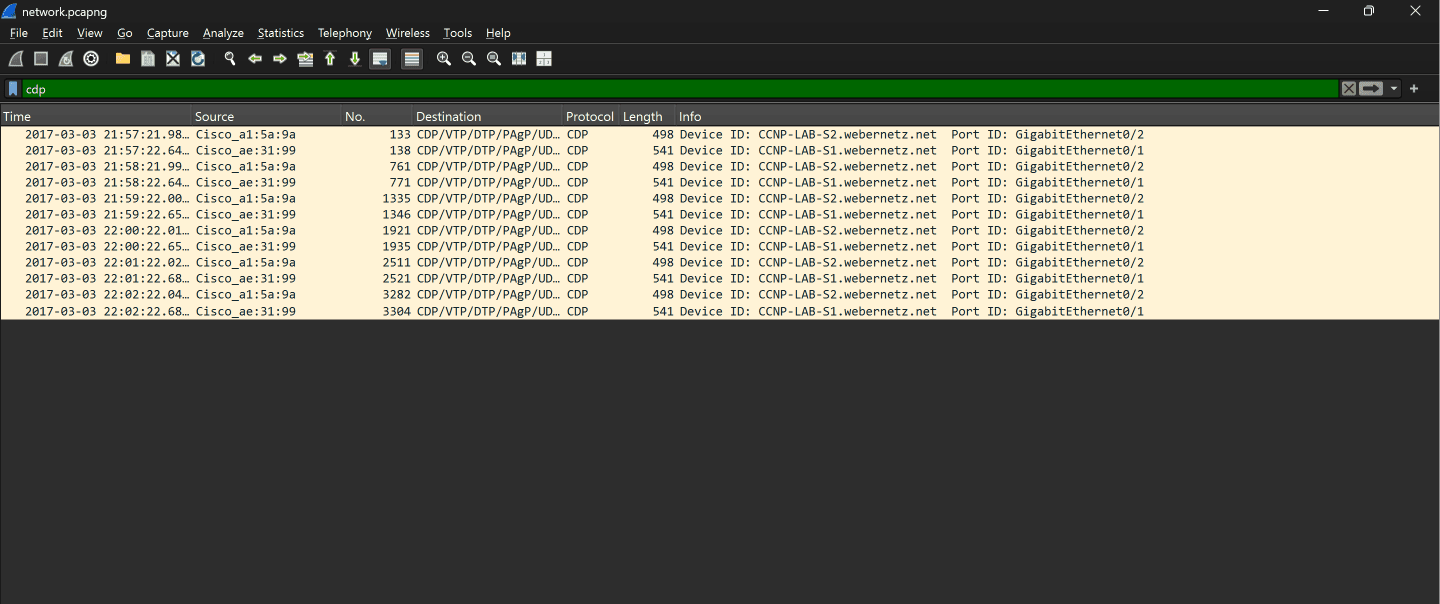
Q22: What is the MAC address for the root bridge for VLAN 60?
Filter for STP traffic specifically tagged on VLAN 60: vlan.id == 60 && stp.
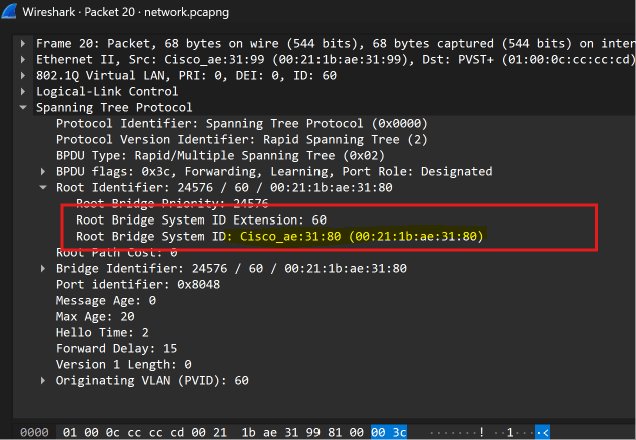
Select any matching BPDU packet (e.g., Packet 20).
Expand Spanning Tree Protocol ➔ Root Identifier.
Read the Root Bridge System ID MAC: 00:21:1b:ae:31:80.
vlan.id == 60 && stp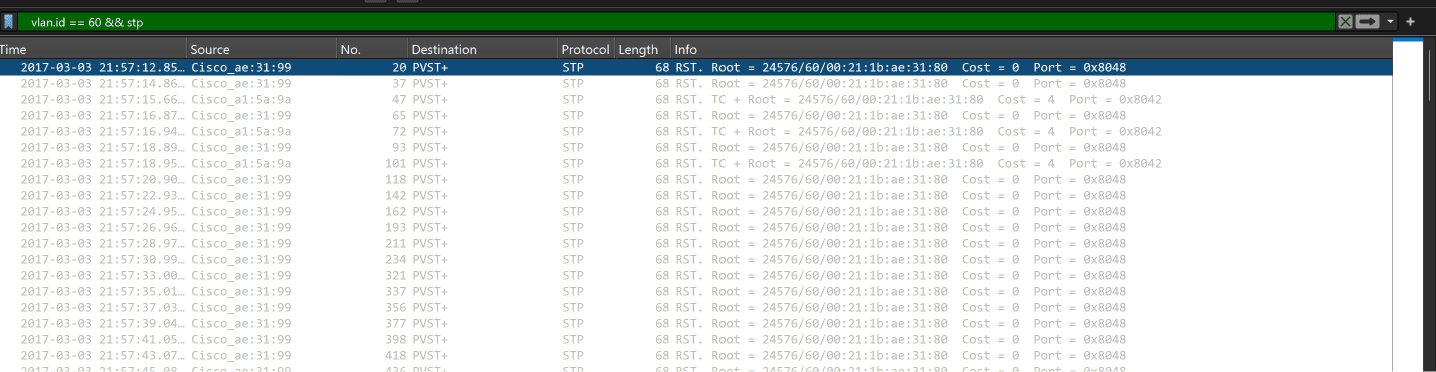
Q23: What is the IOS version running on CCNP-LAB-S2?
Return to the CDP announcement for switch CCNP-LAB-S2 (Packet 133).
Expand the Software Version TLV.
It displays: IOS (tm) C2950 Software (C2950-I6K2L2Q4-M), Version 12.1(22)EA14, RELEASE SOFTWARE (fc1).
The IOS release version matching the required format is 12.1(22)EA14.
cdp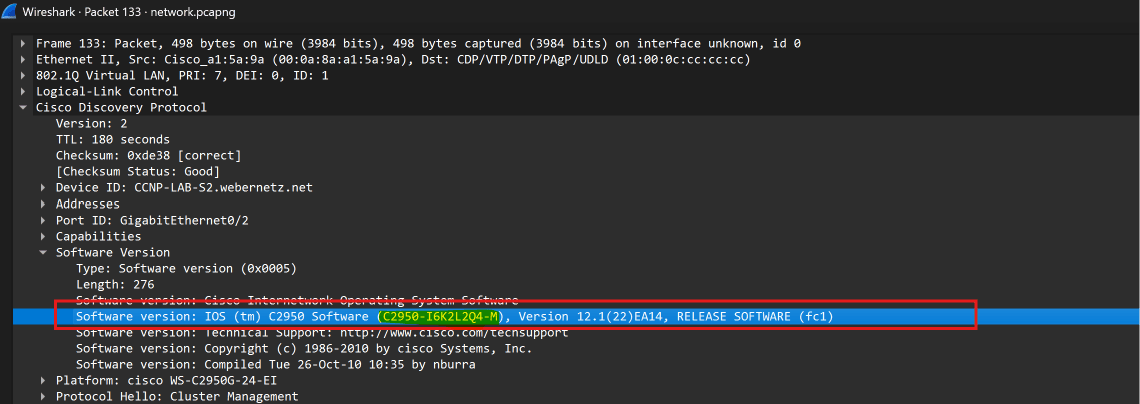
Q24: What is the virtual IP address used for HSRP group 121?
Filter for Cisco Hot Standby Router Protocol traffic: hsrp (or group 121: hsrp2.group == 121).
Select an HSRP packet belonging to group 121 (e.g., Packet 15).
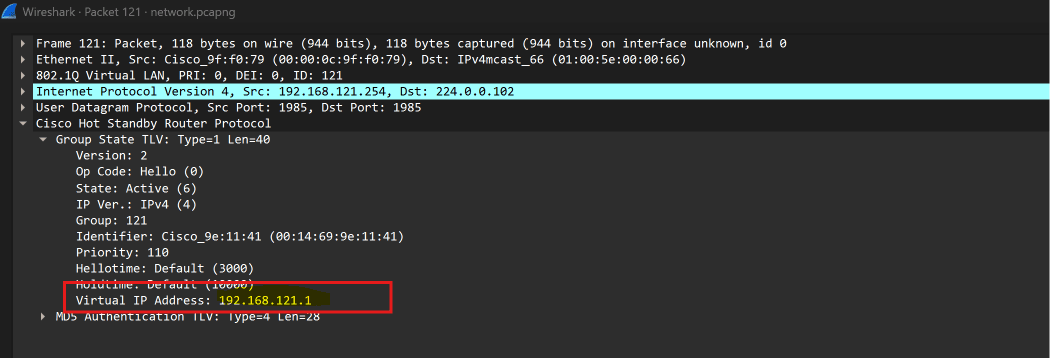
Expand Cisco Hot Standby Router Protocol ➔ Group State TLV.
Inspect the Virtual IP Address field: 192.168.121.1.
hsrp || hsrp2.group == 121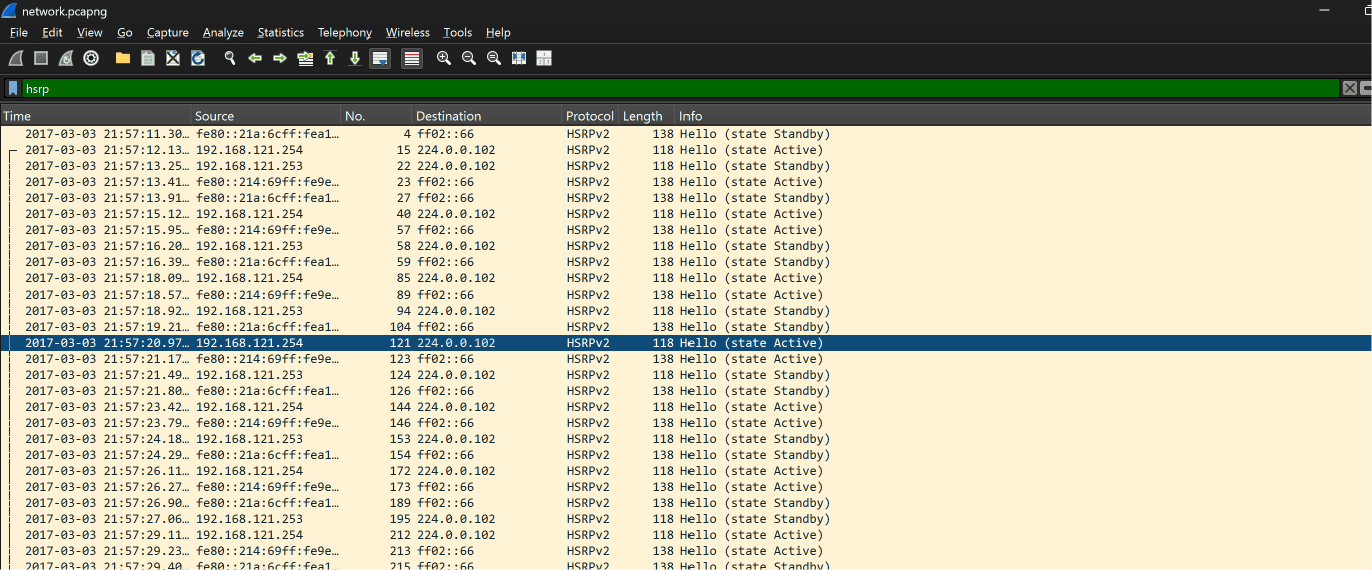
Q25: How many router solicitations were sent?
Technical Context: Under IPv6 SLAAC (Stateless Address Autoconfiguration), connecting hosts broadcast ICMPv6 Router Solicitations to ff02::2 (All-Routers multicast) requesting network prefixes.
In ICMPv6, Type 133 designates Router Solicitations (while Type 134 designates Router Advertisements).
Filter directly for solicitations: icmpv6.type == 133.
Wireshark isolates exactly 3 packets: Packet 1187, Packet 1220, and Packet 1267. Check Wireshark status bar: Packets: 3890 · Displayed: 3 (0.1%).
icmpv6.type == 133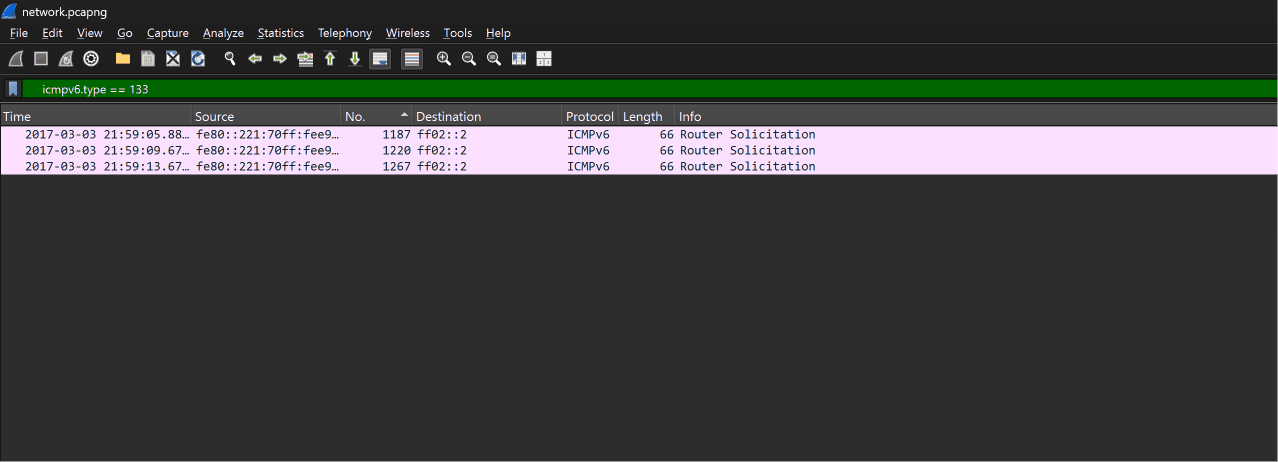
Q26: What is the management address of CCNP-LAB-S2?
Return to the CDP packet for CCNP-LAB-S2 (Packet 133).
Expand the Management Addresses TLV (or Addresses section).
The configured device management IP is listed as 192.168.121.20.
cdp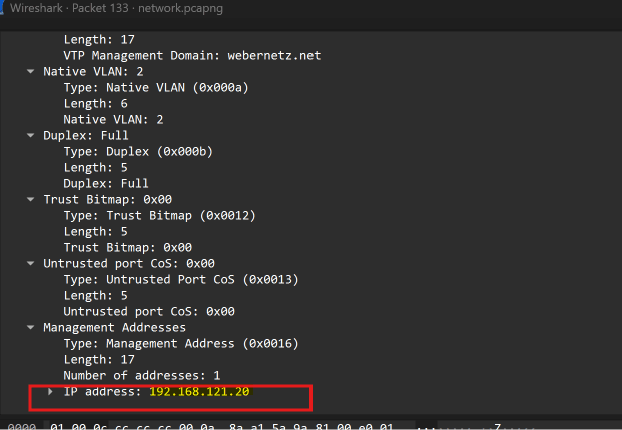
Q27: What is the interface being reported on in the first SNMP query?
Filter for Simple Network Management Protocol traffic: snmp.
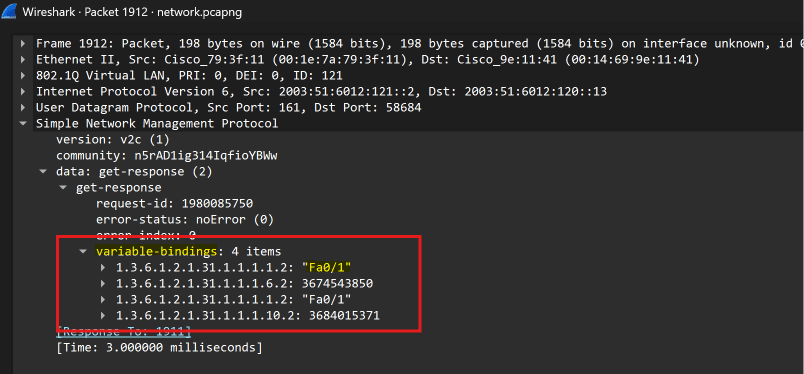
Locate the first query sequence: Packet 1911 (get-request) and Packet 1912 (get-response).
In Packet 1912, expand variable-bindings.
The SNMP response resolves OID 1.3.6.1.2.1.31.1.1.1.1.2 (IF-MIB ifName for index 2) with the string "Fa0/1" (FastEthernet 0/1).
snmp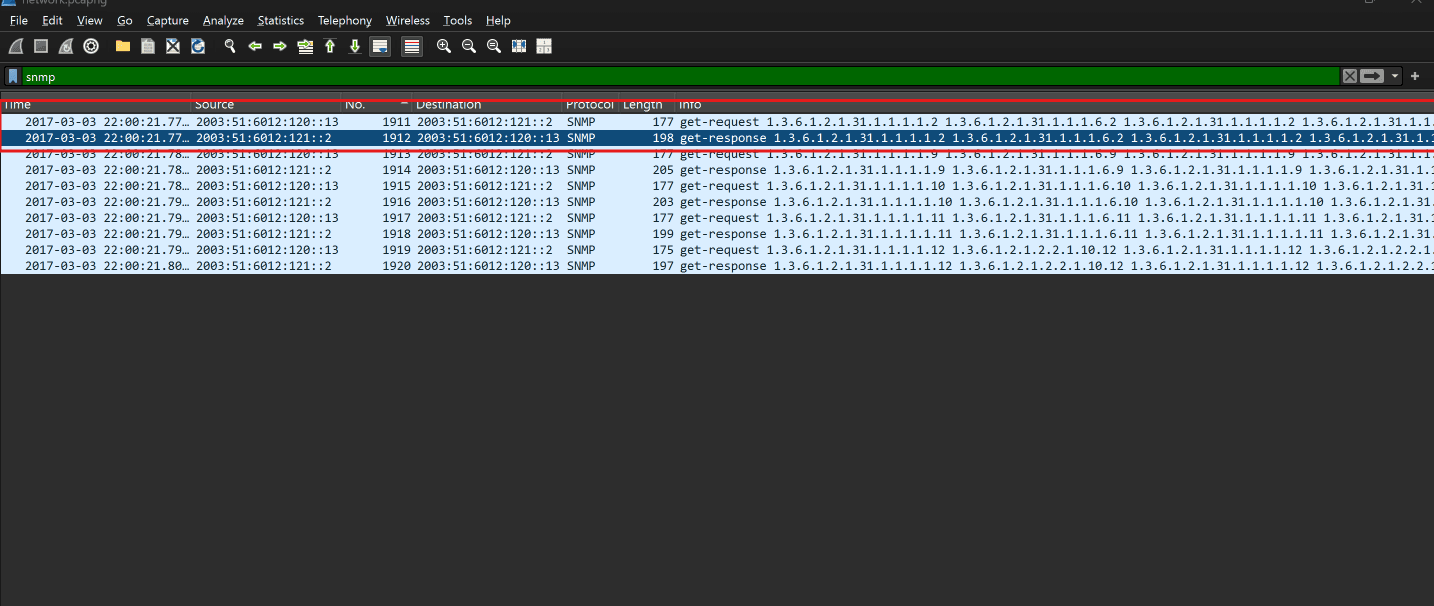
Q28: When was the NVRAM config last updated?
Network engineers often automate Cisco router backups using archive over TFTP.
Filter for TFTP traffic: tftp.
In Packet 3766, the router sends a TFTP Write Request for file CCNP-LAB-R2-Mar--3-20-02-38.701-7.
Right-click Packet 3766 ➔ Follow ➔ UDP Stream (or export the object via File ➔ Export Objects ➔ TFTP...).
Read the timestamp comments stamped at the very top of the configuration:
! Last configuration change at 20:55:45 UTC Fri Mar 3 2017 by weberjoh
! NVRAM config last updated at 21:02:36 UTC Fri Mar 3 2017 by weberjoh
Formatting as yyyy-mm-dd hh:mm gives 2017-03-03 21:02.
tftp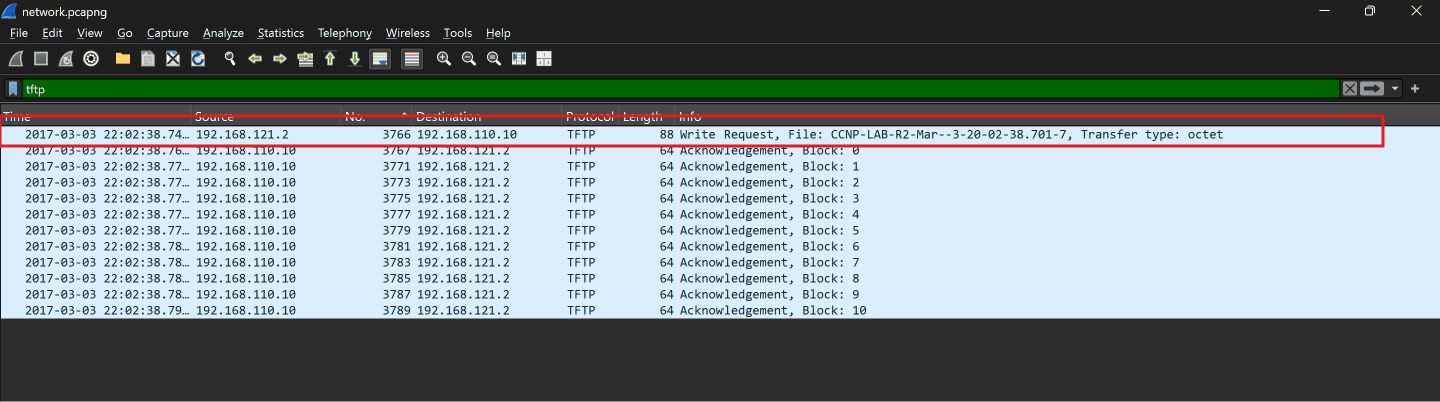
Q29: What is the IPv6 of the RADIUS server?
In enterprise network operations, RADIUS provides centralized AAA authentication for administrative switch and router logins.
Search within the plaintext Cisco router configuration dumped in Q28 for the keyword radius.
The configuration reveals:
radius server blubb
address ipv6 2001:DB8::1812 auth-port 1812 acct-port 1813
The configured RADIUS server IPv6 address is 2001:DB8::1812.
Follow UDP Stream 8 (TFTP config)https.pcapngDecrypted TLS & pfSense Administration
Covering questions 30 through 35 with Wireshark packet stream analysis.
Q30: What has been added to web interaction with web01.fruitinc.xyz?
Prerequisite — TLS Decryption: Open https.pcapng. Go to Edit ➔ Preferences... ➔ Protocols ➔ TLS. Under (Pre)-Master-Secret log filename, browse and select secret_sauce.txt from the lab archive. Wireshark instantly decrypts all TLS streams!
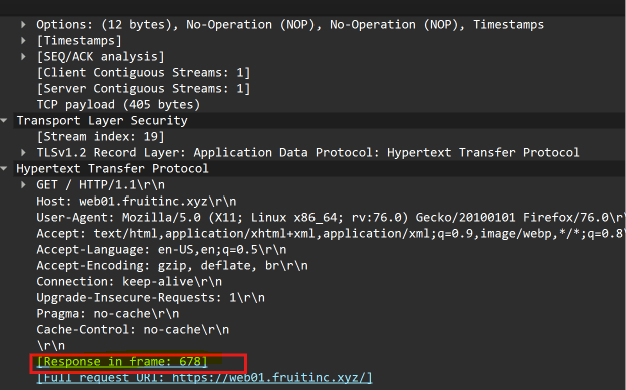
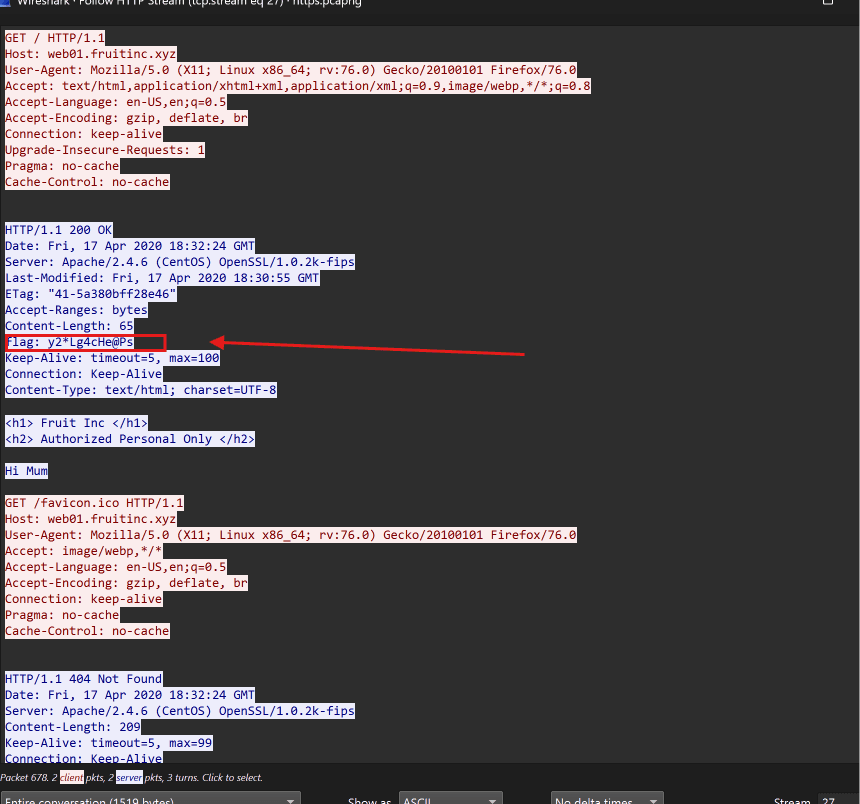
The Missing Response Wireshark Trap: Filtering by http.host == "web01.fruitinc.xyz" only displays request frames (675 and 707) because responses do not have a Host: header!
Filter instead by destination server IP: ip.addr == 192.168.2.20 && http (or follow the HTTP stream on Packet 675).
Inspect the server response in Packet 678 (HTTP/1.1 200 OK). Under the HTTP headers, locate the custom response header: flag: y2*Lg4cHe@Ps.
ip.addr == 192.168.2.20 && http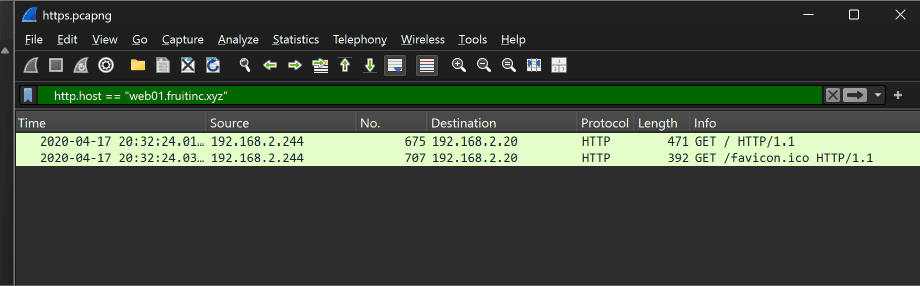
Q31: What is the name of the photo that is viewed in slack?
Slack serves media assets through files.slack.com. In-feed channel previews download thumbnail assets from /files-tmb/.
Filter for Slack file requests: http.host == "files.slack.com".
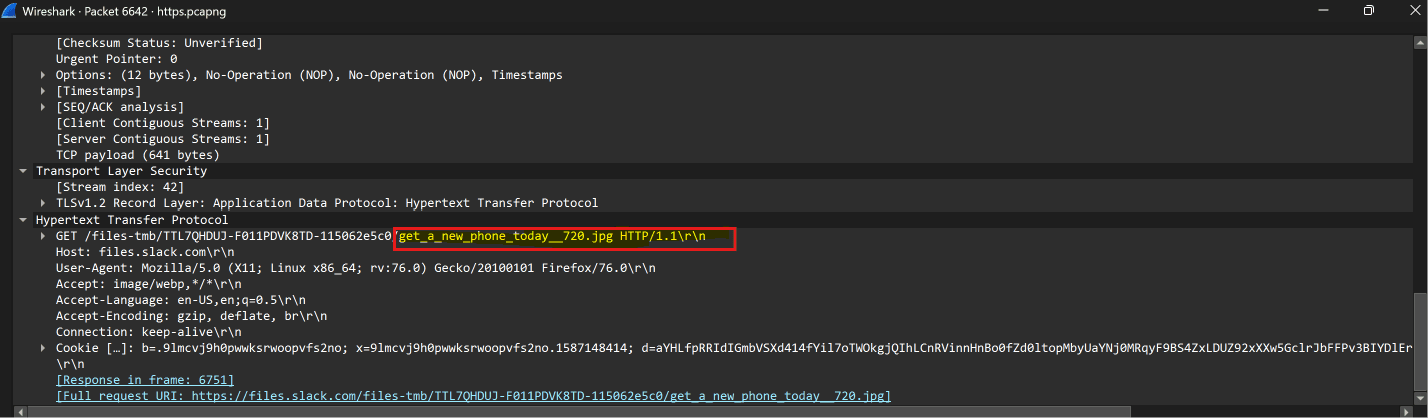
Inspect Packet 6642:
GET /files-tmb/TTL7QHDUJ-F011PDVK8TD-115062e5c0/get_a_new_phone_today__720.jpg HTTP/1.1
Notice the pattern with the double underscore before 720: get_a_new_phone_today__720.jpg.
http.host == "files.slack.com"
Q32: What is the username and password to login to 192.168.2.1?
Traffic to the pfSense firewall at 192.168.2.1 utilizes HTTP/2.
Filter for HTTP/2 traffic communicating with the gateway: ip.addr == 192.168.2.1 && http2.
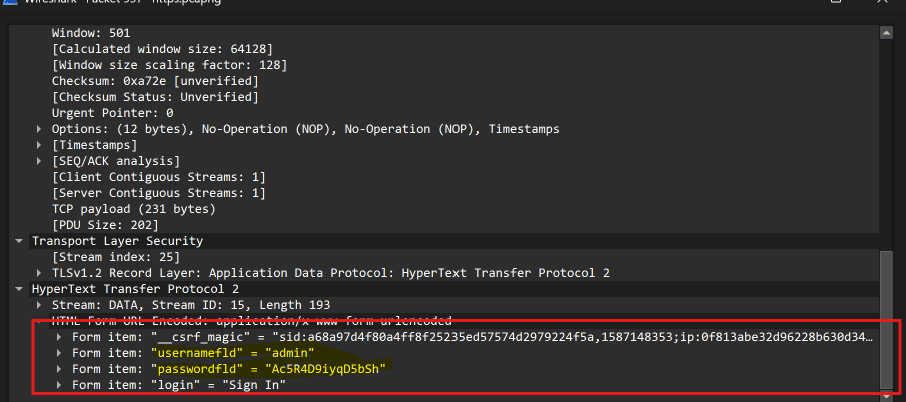
Locate Packet 936 (HTTP/2 HEADERS frame for POST /) followed by Packet 937 (HTTP/2 DATA frame).
Expand HTML Form URL Encoded: application/x-www-form-urlencoded:
usernamefld: admin
passwordfld: Ac5R4D9iyqD5bSh
Formatted as username:password gives admin:Ac5R4D9iyqD5bSh.
ip.addr == 192.168.2.1 && http2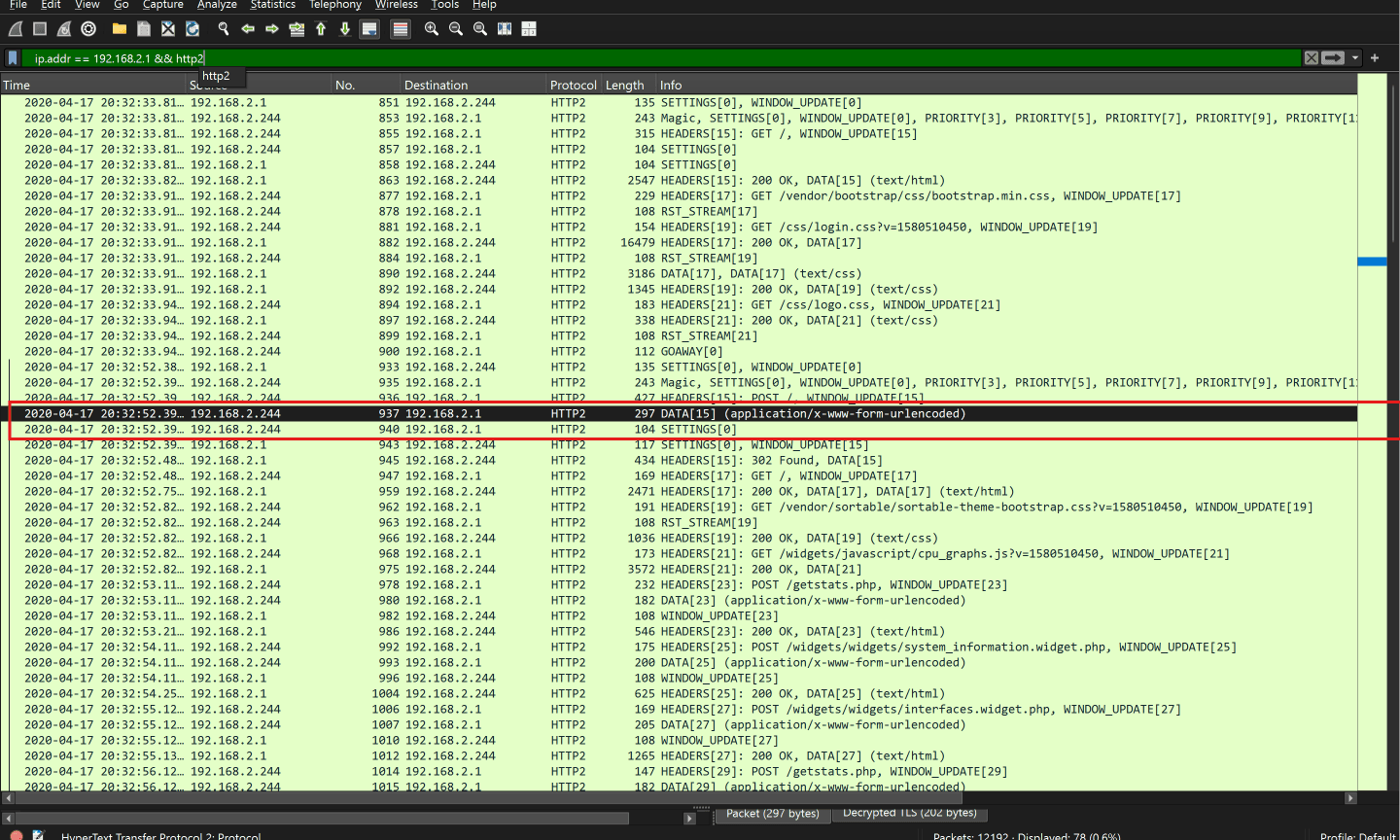
Q33: What is the certStatus for the certificate with a serial number of 07752cebe5222fcf5c7d2038984c5198?
Online Certificate Status Protocol (OCSP) verifies whether an SSL/TLS certificate has been revoked.
Filter for OCSP packets: ocsp (or match the serial: ocsp.serialNumber == 07:75:2c:eb:e5:22:2f:cf:5c:7d:20:38:98:4c:51:98).
Inspect the OCSP response in Packet 160.
Expand Online Certificate Status Protocol ➔ responseBytes ➔ BasicOCSPResponse ➔ tbsResponseData ➔ responses.
Under serial number 0x07752cebe5222fcf5c7d2038984c5198, inspect the status field: certStatus: good (0).
ocsp.serialNumber == 07:75:2c:eb:e5:22:2f:cf:5c:7d:20:38:98:4c:51:98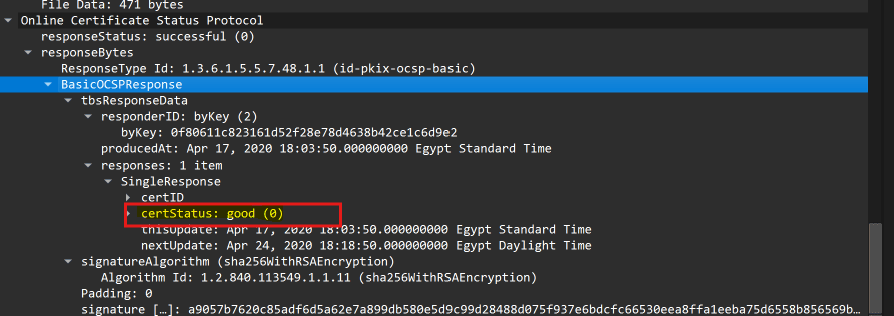
Q34: What is the email of someone who needs to change their password?
Filter for decrypted HTTP form submissions containing plaintext passwords: urlencoded-form.key == "password".
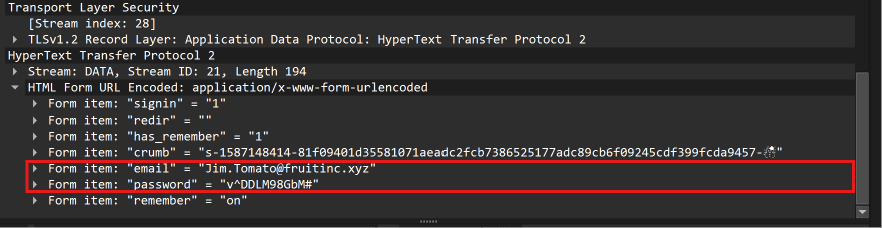
Examine Packet 4758 (authentication request submitted to fruitincworkspace.slack.com).
In the URL-encoded POST payload:
email: Jim.Tomato@fruitinc.xyz
password: v^DDLM98GbM#
Employee Jim Tomato transmitted his account credentials over an insecure connection, exposing his password.
urlencoded-form.key == "password"
Q35: A service is assigned to an interface. What is the interface, and what is the service?
In Q32, the administrator authenticated into the pfSense firewall at 192.168.2.1.
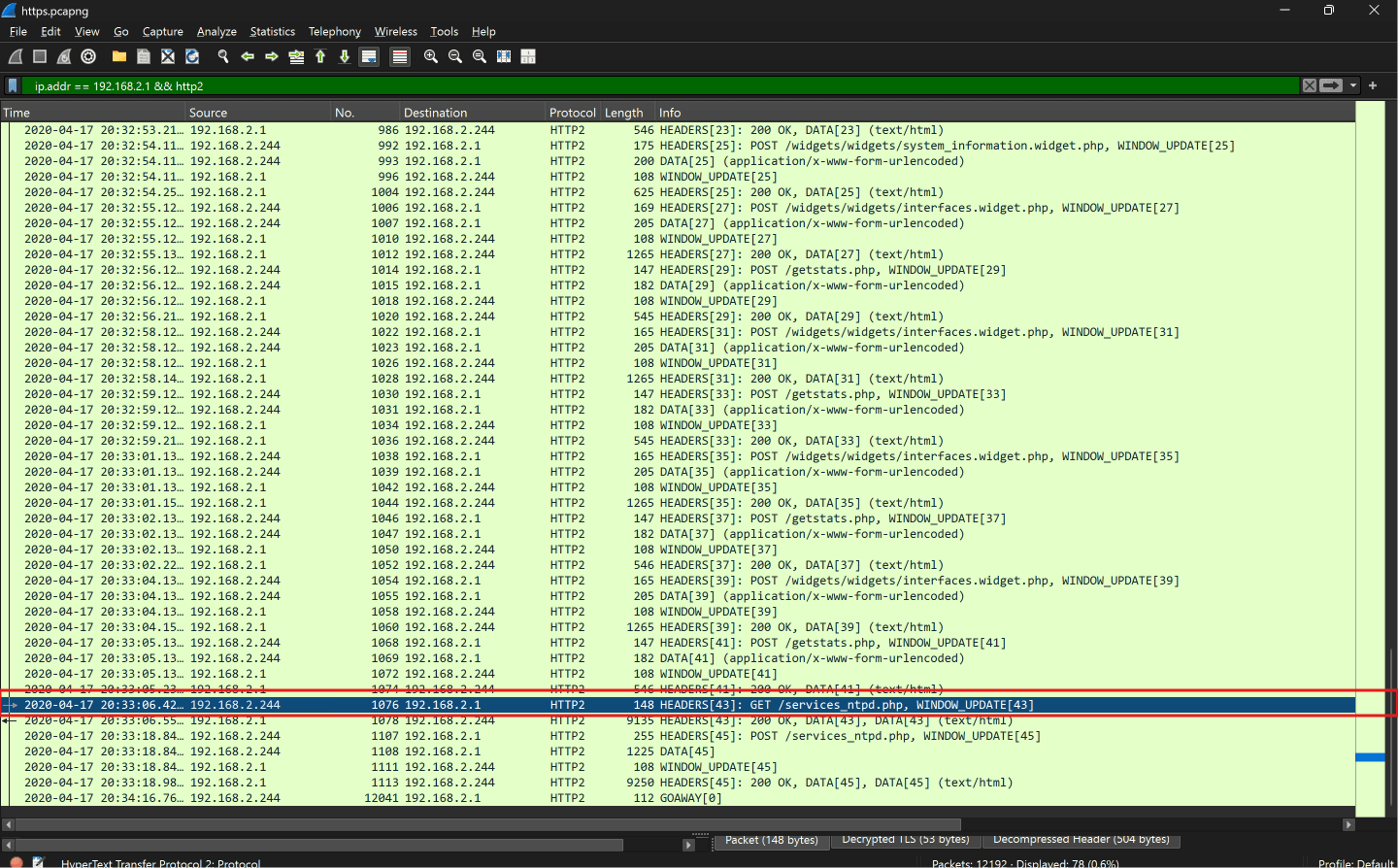
In Packet 1076, the admin accesses GET /services_ntpd.php (NTP daemon management).
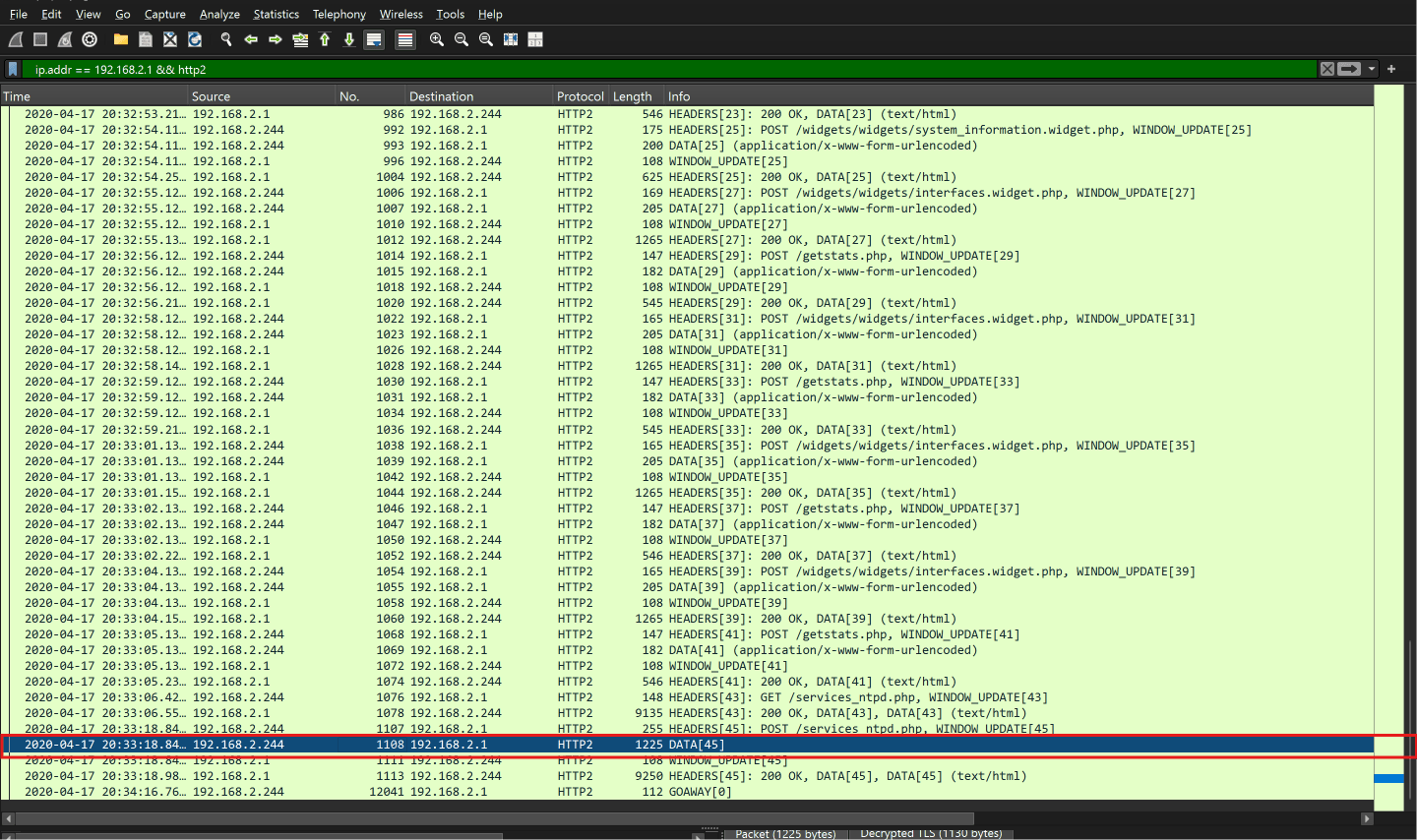
In Packets 1107 & 1108, the admin submits a configuration form: POST /services_ntpd.php.
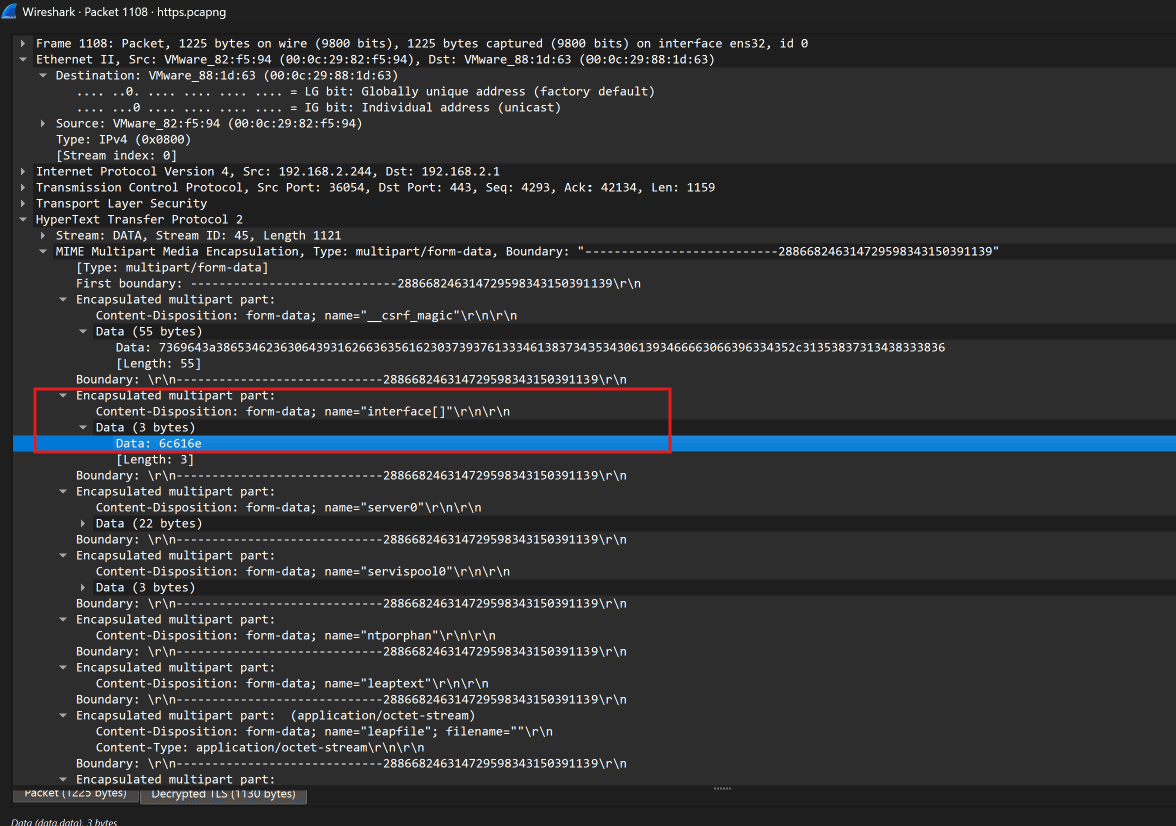
Inspect the multipart form payload in Packet 1108 under name="interface[]":
Raw data is displayed in hex: 6c616e. Converting hex to ASCII: 6c (l), 61 (a), 6e (n) ➔ lan.
The configured daemon service is ntp on interface lan, formatted as lan:ntp.
ip.addr == 192.168.2.1 && http2