B1g_Mac: Reversing Windows Timestomper & WinDbg EIP Hijacking
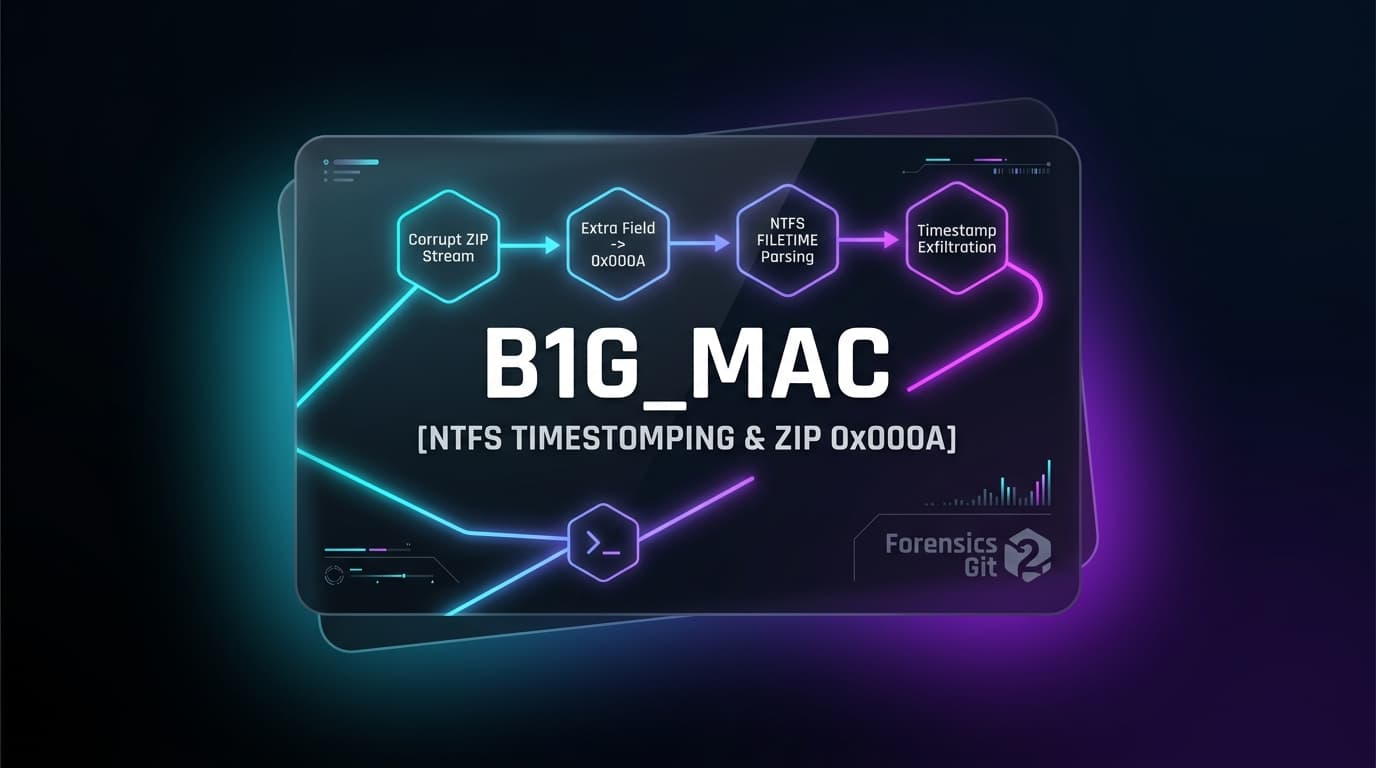
Executive Methodology: The 3-Step Attack Vector
In this challenge, an adversary wrote a custom 32-bit Windows binary (main.exe) to hide sensitive data inside NTFS file modification timestamps. Rather than writing a script to manually parse raw timestamp bytes, we can leverage the executable's own unreferenced decoding routine by redirecting the Instruction Pointer (EIP) in a debugger!
main + 0x1AFE.EIP to decode function to print flag!Step 1: File Preparation & The 7-Zip Trap
Before touching any debugger or reverse engineering tool, there is a critical forensic trap that trips up almost every beginner:
When you extract b1g_mac.zip using the standard Windows built-in utility (Right-click > Extract All...), the Windows Explorer shell writes new files to disk and updates their modification dates to the current system time. This immediately overwrites the sub-second nanosecond data and permanently destroys the encoded flag!
By contrast, 7-Zip preserves the exact 64-bit Windows FILETIME attributes stored inside the ZIP archive's PKWARE NTFS Extra Field (Tag 0x000A), keeping the encoded flag intact.
Right-Click b1g_mac.zip > 7-Zip > Extract to "b1g_mac\"Step 2: Static Analysis in Ghidra (Finding the Hidden Decode Function)
Opening main.exe in Ghidra reveals the entire program architecture:
The program begins in main. At instruction 0x00401c20, it attempts to open and read flag.txt. If the file does not exist on your machine, it terminates immediately with an error:
If flag.txt were present, it would call a function named _listdir (at 0x00401cb7) with parameter 0 to perform the hiding (timestomping) into the test/ directory.

_listdir
00401cb7 CALL _listdirInspecting the functions list in Ghidra reveals an unreferenced function at address 0x00401afe (main + 0x1afe):
- This function is never called by
mainunder normal execution. - It invokes
_listdirwith parameter 1 (the decode flag). - When invoked with parameter
1,_listdirreads the timestamps of all files intest/, extracts the lower 16 bits of eachLastWriteTime, and prints the decoded flag to the console!
Step 3: Dynamic Analysis in WinDbg (The EIP Register Hijack)
Because the decode function already exists inside the binary, we don't need to write a standalone script. We can run the program in a debugger and force execution to jump directly to the decode method!
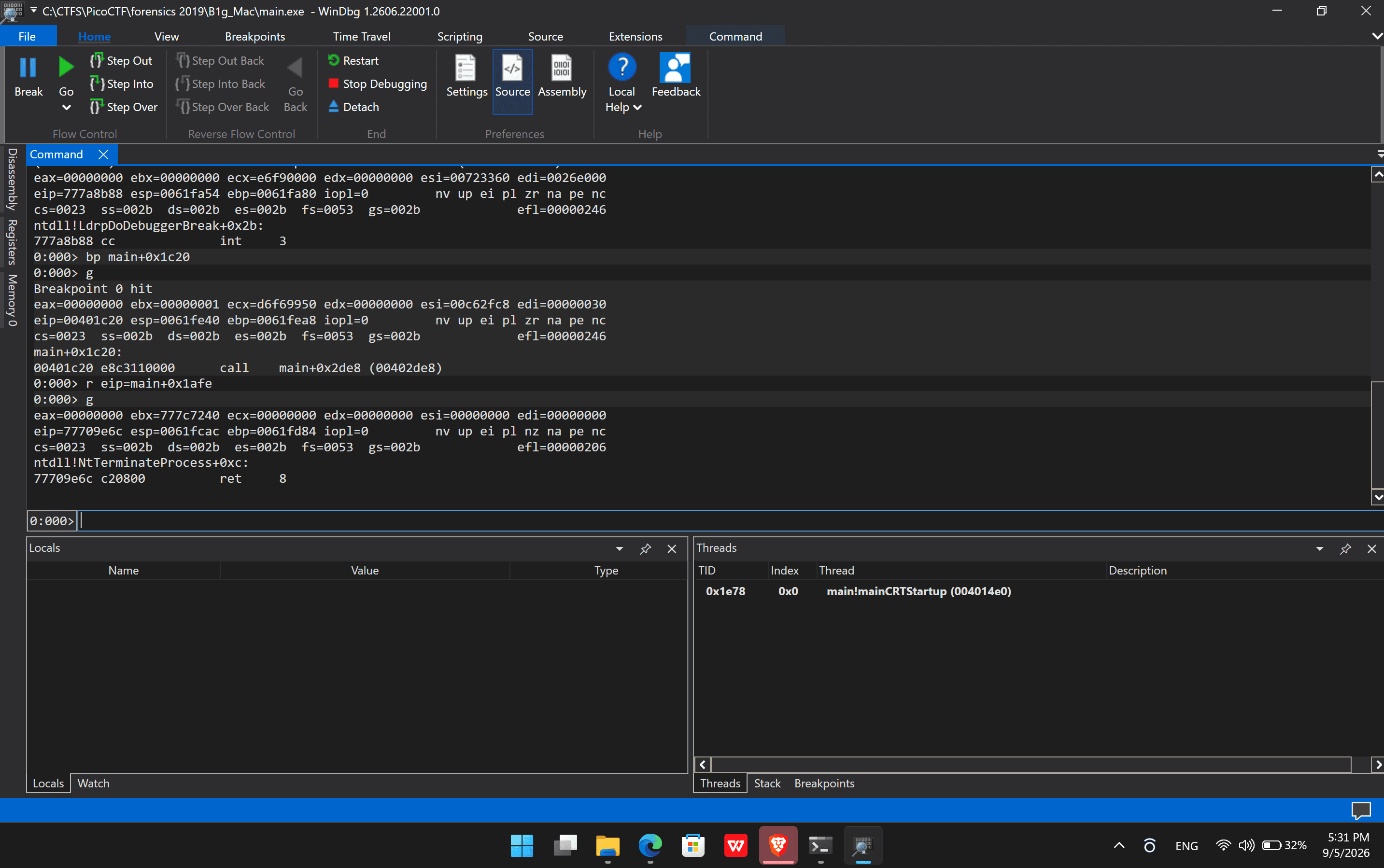
- Attach/Launch Target: Open
main.exein WinDbg (File > Open Executable). Make sure the working directory contains the extractedtest/folder. - Set Breakpoint: Set a breakpoint right before the program reads
flag.txt:0:000> bp main+0x1c20 - Run to Breakpoint: Execute with
g(Go). The breakpoint is hit at00401c20. - Hijack the Instruction Pointer (EIP): What is the purpose of setting EIP? The Instruction Pointer controls which instruction the CPU will execute next. By changing EIP to
main+0x1afe, we skip the missingflag.txtcheck entirely and jump straight into the decode function:0:000> r eip=main+0x1afe - Resume Execution: Type
gto run!
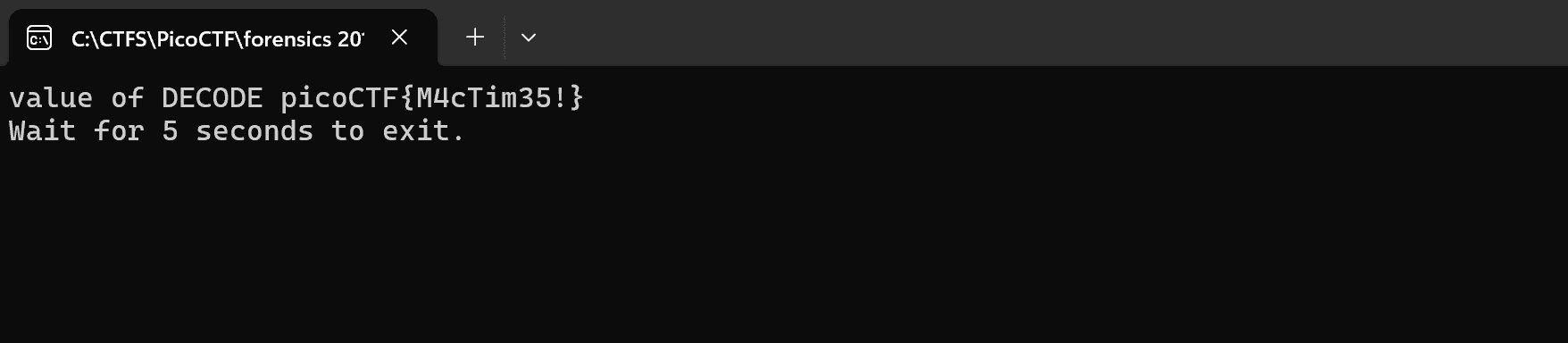
Captured Flag:
picoCTF{M4cTim35!}
Alternative Fast Track: 1-Line Python Solver (No Debugger Needed)
If you are on Linux or macOS without access to WinDbg, you can extract the exact same timestamps directly from the ZIP Extra Field (Tag 0x000A) using Python:
python -c "import zipfile, struct; z=zipfile.ZipFile('b1g_mac.zip'); print(''.join(chr((m&0xffff)>>8)+chr(m&0xff) for m in [struct.unpack('<Q', f.extra[12:20])[0] for f in z.infolist() if ' - Copy.bmp' in f.filename]))"Core Conceptual Q&A (English & بالعربية)
Standard Windows extraction alters file timestamps on creation, overwriting the encoded flag. 7-Zip preserves the exact original 64-bit NTFS FILETIME timestamps stored in the ZIP archive.
Ghidra shows that _listdir takes a parameter: 0 to encode/hide bytes and 1 to decode bytes. Looking for functions calling _listdir with 1 reveals the unreferenced decode function at 0x00401afe.
The Instruction Pointer (EIP) dictates CPU execution. Setting EIP = main+0x1afe forces the CPU to jump directly to the hidden decode method, bypassing the missing flag.txt check and printing the flag from the timestomped files.
يعتمد تحدي B1g_Mac على الهندسة العكسية لبرنامج ويندوز لإيجاد علم مخفي داخل الطوابع الزمنية (Timestamps) لملفات الصور:
- تحضير الملفات: استخراج الملفات باستخدام 7-Zip للحفاظ على الطوابع الزمنية الأصلية بدقة النانوثانية.
- التحليل الساكن (Ghidra): فحص دالة
mainواكتشاف دالة فك التشفير غير المستدعاة عند العنوان0x00401afe. - التحليل الديناميكي (WinDbg): وضع نقطة توقف
bp main+0x1c20وتغيير مؤشر التعليماتr eip=main+0x1afeلتخطي فحصflag.txtوتشغيل دالة فك التشفير مباشرة وطباعة العلم!