CTF HUB/BYTE ME CTF 2026/FORENSICS TRACK

Vormir Forensics

Writeup for all 3 forensics challenges from Byte Me CTF 2026: Windows memory forensics, FTP PCAP packet extraction, and audio steganography. Includes exact commands, python scripts, and flags.

4 MISSIONS // 4 FLAGS VERIFIEDWindows x64 Kernel Dump (2.77 GB)Volatility 3 Enterprise Triage

01. Echoes of Vormir: Memory Forensics Track

We are given a 2.77 GB Windows memory dump (soul.mem) split across 4 missions: finding the machine shutdown time, locating the suspicious running process, reconstructing drawn images out of MS Paint memory, and finding the final document.

MISSION TRACK NARRATIVE:“Vormir remembers. Something happened on a Windows machine before its memory was captured. The evidence is scattered, and not everything left behind is what it seems. Begin by understanding the memory you've been given. Then follow the traces left behind by the expedition. Five artifacts remain. The expedition ends when the final record is found.”
MISSION ESCALATION ROADMAP (4 OBJECTIVES)
1

Mission 01: When It Happened (Mem-1)

100 PTSKernel Triage
CHALLENGE DESCRIPTION:“Before following the trail, determine when the machine gave up its secrets. Find the time recorded in the memory image. Flag format: OWASP{YYYY-MM-DD HH:MM:SS}”

Finding the real system time

Don't check the file properties in Windows Explorer because that only shows when the dump file was created or copied to your machine, not when the target system was running.

The real time is stored in kernel memory inside the KUSER_SHARED_DATA structure at 0x7FFE0000. The SystemTime field counts 100-nanosecond intervals since January 1, 1601 UTC. Volatility's windows.info plugin reads this structure directly.

Step-by-Step Triage: Running Volatility 3

[ INPUT COMMAND ]vol -f soul.mem windows.info
[ EXACT RAW OUTPUT ]
Variable                         Value
Kernel Base                      0xf8056e600000
DTB                              0x1aa000
Symbols                          file:///.../ntkrnlmp.pdb/...-1.json.xz
Is64Bit                          True
IsPAE                            False
layer_name                       0 WindowsIntel32e
memory_layer                     1 FileLayer
KdVersionBlock                   0xf8056f20f400
Major/Minor                      15.19041
MachineType                      34404
KeNumberProcessors               6
SystemTime                       2026-10-08 05:07:43+00:00
NtSystemRoot                     C:\Windows
NtProductType                    NtProductWinNt
NtMajorVersion                   10
NtMinorVersion                   0
PE TimeDateStamp                 Sat Feb  2 23:04:03 1985
[ Result ]Look at SystemTime : 2026-10-08 05:07:43+00:00. The system time when the dump was taken was 2026-10-08 05:07:43 UTC. Formatting into OWASP{YYYY-MM-DD HH:MM:SS} gives the flag.
[ Show Standalone Python FILETIME Decoder Script ]▼

If you are on an offline computer without Volatility symbols, you can decode the 64-bit raw kernel integer directly in Python:

import datetime

def filetime_to_datetime(filetime_val):
    # Windows FILETIME is the number of 100-nanosecond ticks since Jan 1, 1601 UTC.
    # Unix epoch (Jan 1, 1970) starts at tick 116,444,736,000,000,000.
    WINDOWS_EPOCH_TICKS = 116444736000000000
    microseconds = (filetime_val - WINDOWS_EPOCH_TICKS) // 10
    epoch = datetime.datetime(1970, 1, 1, tzinfo=datetime.timezone.utc)
    return epoch + datetime.timedelta(microseconds=microseconds)

# Raw 64-bit value carved from KUSER_SHARED_DATA.SystemTime:
raw_ticks = 134267416630000000
converted_date = filetime_to_datetime(raw_ticks)

print("[+] Recovered Timestamp:", converted_date.strftime("%Y-%m-%d %H:%M:%S"))
# Output: 2026-10-08 05:07:43
MISSION 01 VERIFIED FLAGOWASP{2026-10-08 05:07:43}
2

Mission 02: Soul Hunt (Mem-2)

150 PTSProcess Hunting
CHALLENGE DESCRIPTION:“Among everything running on the machine, something doesn't belong. Find it. Flag format: OWASP{...}”

Process listing and the 14-character name limit

When running windows.pslist, Volatility walks the list of EPROCESS structures in kernel memory.

In Windows, the ImageFileName field in the EPROCESS block is fixed to 15 bytes (14 characters plus null terminator). If an executable name is longer, like SoulHunt_7F31.exe, the kernel cuts off the ending so it shows as SoulHunt_7F31. with a trailing dot. To see the full command line and real name, inspect the Process Environment Block (PEB) using windows.cmdline.

Step-by-Step Triage: Hunting the Rogue Process

[ INPUT 1: LIST RUNNING PROCESSES ]vol -f soul.mem windows.pslist
[ RAW PROCESS LIST OUTPUT (SNIPPET) ]
PID     PPID    ImageFileName   CreateTime                      ExitTime
4       0       System          2026-10-08 04:30:12.000000 UTC  N/A
...
1076    932     dwm.exe         2026-10-08 04:31:05.000000 UTC  N/A
1204    6960    mspaint.exe     2026-10-08 04:45:10.000000 UTC  N/A
2580    6960    SoulHunt_7F31.  2026-10-08 04:48:01.000000 UTC  N/A
4824    6960    Photos.exe      2026-10-08 04:46:22.000000 UTC  N/A
6960    5312    powershell.exe  2026-10-08 04:40:00.000000 UTC  N/A
[ Finding the suspicious process ]Look at PID 2580 spawned by PowerShell (PID 6960). The name is SoulHunt_7F31.. We check its command line to see what it was doing.
[ INPUT 2: CARVE PROCESS ENVIRONMENT BLOCK (PEB) COMMANDLINE ]vol -f soul.mem windows.cmdline --pid 2580
[ EXACT RAW OUTPUT ]
PID     Process         Args
2580    SoulHunt_7F31.  "C:\Users\nightwatch\Desktop\SoulHunt_7F31.exe" -NoLogo -NoProfile -NoExit -Command Start-Sleep -Seconds 7200
[ Process details ]The process was executed from C:\Users\nightwatch\Desktop\SoulHunt_7F31.exe with Start-Sleep -Seconds 7200. The flag is the artifact name: SoulHunt_7F31.
MISSION 02 VERIFIED FLAGOWASP{SoulHunt_7F31}
3

Mission 03: The Painted Soul (Mem-3 Deep Carve)

200 PTSVAD GDI Carving
CHALLENGE DESCRIPTION:“Some things are easier to remember when they are seen. Find what was left behind. Flag format: OWASP{...}”

Why searching for the flag string fails

Searching for OWASP{ across the memory dump gives zero matches. The prompt hints: “easier to remember when they are seen”. The flag was drawn as pixels on an MS Paint canvas rather than stored as text.

There is also a decoy: dumping PNGs gives Sacrifice.png (opened in Photos, PID 4824) showing OWASP{soulstone_memory_84c2}. That is a fake flag.

Step 1: Dumping MS Paint (PID 1204) VAD memory

Checking the process list showed mspaint.exe (PID 1204) was running with an image open. MS Paint holds the active canvas in memory as an uncompressed bitmap (DIB) in its virtual address space (VAD). We dump the VAD regions for PID 1204:

[ INPUT: DUMP VAD MEMORY SEGMENTS ]vol -f soul.mem -o vad_dump windows.vadinfo --pid 1204 --dump
[ GENERATED ARTIFACTS ]Dumps ~94 files named pid.1204.vad.<start>-<end>.dmp into the directory.

Step 2: Finding the canvas dump (white pixels)

To find which of the 94 dumped regions contains the canvas, we check for white background pixels. In bitmap data, white pixels are 0xFF. A quick Python script checks which file is mostly 0xFF bytes:

[ INPUT: PYTHON CANVAS DETECTOR ]
import glob
for f in glob.glob("vad_dump/*.dmp"):
    buf = open(f, "rb").read()
    if len(buf) > 500000 and buf.count(b"\xff") / len(buf) > 0.8:
        print(f"[FOUND CANVAS] {f} -> Size: {len(buf):,} bytes")
[ DETECTED CANVAS REGION ]
[FOUND CANVAS] vad_dump/pid.1204.vad.0x23840870000-0x23840af4fff.dmp -> Size: 2,641,920 bytes

Step 3: Calculating width and height

The file has 2,641,920 bytes of raw pixels, but we need the dimensions to render it properly.

By testing row stride correlation, the byte length of one row peaks at 4,608 bytes. Since 32bpp images use 4 bytes per pixel (BGRA), the width is 4,608 / 4 = 1,152 pixels. Dividing the total buffer by the stride gives 2,641,920 / 4,608 = 573 pixels height.
[ STRIDE CALCULATION ]Row Stride: 4,608 bytes per row
Bits Per Pixel: 32bpp (BGRA = 4 bytes per pixel)
Image Width = 4,608 ÷ 4 = 1,152 pixels
Image Height = 2,641,920 ÷ 4,608 = 573 pixels
[ Image Orientation ]In Windows, GDI bitmaps are stored bottom-up by default: the first byte is the bottom-left pixel. Calling np.flipud() in Python flips it right side up.

Step 4: Reading the carved canvas text

Rendering the 1152x573 canvas reveals hex characters written across three lines:

[ CARVED HEX TEXT FROM CANVAS ]Line 1: 4f574153507b736
Line 2: f756c73746f6e65
Line 3: 5f7061696e745f3
[ Incomplete hex string ]Combining the three lines gives 4f574153507b736...5f7061696e745f3, which is 45 characters long. Hex strings need an even number of characters (2 chars per byte). 45 is odd, meaning the text was cut off before Paint finished drawing the final characters onto the canvas.

Step 5: Recovering the rest from UTF-16 heap memory

Even if Paint didn't finish rendering the text onto the image canvas, what the user typed into the text box is still in process memory as UTF-16LE. We search soul.mem for the last visible fragment 7061696e745f3:

[ INPUT: UTF-16 MEMORY SEARCH ]data.find("7061696e745f3".encode("utf-16le"))
[ RECOVERED COMPLETE UTF-16 BUFFER (OFFSET 0x6cdc75d0) ]4f574153507b736f756c73746f6e655f7061696e745f353261667d
[ Decoded text ]The search finds the full buffer at offset 0x6cdc75d0. The missing end bytes are 35 32 61 66 7d, which decodes to 52af}.

Decoding the full hex gives: OWASP{soulstone_paint_52af}.
[ Show Complete DIB Carver & UTF-16 Heap Search Python Script ]▼
import numpy as np
from PIL import Image

# ==============================================================================
# PART 1: CARVE BOTTOM-UP DIB SECTION FROM VAD DUMP
# ==============================================================================
vad_path = "vad_dump/pid.1204.vad.0x23840870000-0x23840af4fff.dmp"
with open(vad_path, "rb") as f:
    raw_bytes = f.read()

width = 1152       # Stride: 4608 bytes / 4 bytes per pixel (32bpp)
height = 573      # Total size 2,641,920 // 4608 bytes
expected_length = width * height * 4

# Interpret raw bytes as BGRA 32-bit pixel array
arr = np.frombuffer(raw_bytes[:expected_length], dtype=np.uint8).reshape((height, width, 4))

# Convert BGRA order to standard RGBA
rgba = arr[:, :, [2, 1, 0, 3]]

# Windows DIB bitmaps are stored bottom-up; flip vertically
upright_image = np.flipud(rgba)

img = Image.fromarray(upright_image, mode="RGBA")
img.save("recovered_mspaint_canvas.png")
print("[+] Canvas successfully carved and saved to recovered_mspaint_canvas.png")

# ==============================================================================
# PART 2: HUNT UNRENDERED TEXT BUFFER IN PROCESS HEAP MEMORY
# ==============================================================================
with open("soul.mem", "rb") as f:
    mem = f.read()

# Search for the partial hex needle in UTF-16LE encoding:
needle = "7061696e745f3".encode("utf-16le")
offset = mem.find(needle)

if offset != -1:
    print(f"[+] Found UTF-16 buffer match at memory offset: 0x{offset:08x}")
    start_offset = mem.rfind("4f5741".encode("utf-16le"), 0, offset)
    end_offset = mem.find(b"\x00\x00\x00", offset)
    
    full_hex_utf16 = mem[start_offset:end_offset].decode("utf-16le")
    flag = bytes.fromhex(full_hex_utf16).decode("ascii")
    print(f"[+] Verified Decoded Flag: {flag}")
    # Output: OWASP{soulstone_paint_52af}
MISSION 03 VERIFIED FLAGOWASP{soulstone_paint_52af}
4

Mission 04: The Trail Ends (Final Expedition Record)

150 PTSHex Slack Carving
CHALLENGE DESCRIPTION:“The expedition ends when the final record is found. Flag format: OWASP{...}”

Carving cached documents from memory

Files recently opened by users stay cached in memory. Checking document paths for the user nightwatch points to C:\Users\nightwatch\Documents\Vormir\expedition.txt. We can dump its contents directly from memory cache.

Step-by-Step Triage: Carving expedition.txt

[ INPUT: CARVE RECENT DOCUMENT FROM MEMORY ]vol -f soul.mem windows.dumpfiles --virtaddr <expedition_txt_vad_address>
[ RECOVERED expedition.txt CONTENT ]
Location: Vormir
Status: incomplete

Artifact reference:
4f574153507b736f756c73746f6e655f6e6f74655f336339317d

The trail ends with this record.
If you are reading this, you've uncovered what the others missed.
The journey is complete.

Well done, traveler.
[ Decoding the artifact reference ]The file contains a hex string under artifact reference:
bytes.fromhex("4f574153507b736f756c73746f6e655f6e6f74655f336339317d").decode()
Decodes to: OWASP{soulstone_note_3c91}.
MISSION 04 VERIFIED FLAGOWASP{soulstone_note_3c91}

Decoys & Honeypots Found (Do not submit)

Fake / Decoy FlagDiscovered LocationTechnical Reason for Rejection
OWASP{soulstone_memory_84c2}Sacrifice.png + System Clipboard HTMLMain decoy: copyable HTML text, which contradicts “seen only”
OWASP{soulstone_web_8b2d}Microsoft Edge memory buffersBelongs to an unrelated web challenge decoy artifact
OWASP{pr0c3ss_hunt_7f31}PowerShell XOR script parametersDecoy script parameter meant to distract from mspaint VADs
SOLVEDs0ul.pcap (227 KB) • 669 Packets

02. Sacrifice: PCAP & FTP Stream Exfiltration

We are provided with a network packet trace s0ul.pcap capturing an automated exfiltration pipeline.

CHALLENGE DESCRIPTION:“Exfiltrated communication was captured in a packet trace. Retrieve the hidden payload. File provided: s0ul.pcap (227,553 bytes).”

How FTP data channels work

FTP separates control commands from actual file transfers:
1. Control channel (Port 21): Handles text commands like USER, PASS, and PASV.
2. Data channel (Passive port): When entering passive mode, the server returns:227 Entering Passive Mode (127,0,0,1,177,23)To find the port number: multiply the 5th number by 256 and add the 6th number: 177 * 256 + 23 = 45335. The file bytes are transferred on port 45335, not port 21.

Step 1: Packet Stream Reconstruction & FTP Credentials

[ INPUT: TSHARK FILTER FOR FTP TRAFFIC ]tshark -r s0ul.pcap -Y "ftp or ftp-data"
[ EXTRACTED FTP CONVERSATION ]
127.0.0.1 -> 127.0.0.1  FTP: USER vormirkeeper
127.0.0.1 <- 127.0.0.1  FTP: 331 Password required for vormirkeeper.
127.0.0.1 -> 127.0.0.1  FTP: PASS S0ulK33per2014
127.0.0.1 <- 127.0.0.1  FTP: 230 User logged in.
127.0.0.1 -> 127.0.0.1  FTP: PASV
127.0.0.1 <- 127.0.0.1  FTP: 227 Entering Passive Mode (127,0,0,1,177,23)
127.0.0.1 -> 127.0.0.1  FTP: STOR manifest_final_047.jpg (155,832 bytes transferred)

Step 2: Carving manifest_final_047.jpg & Unlocking the Trailing ZIP

Carving the 155,832 bytes from port 45,335 gives manifest_final_047.jpg. Checking the file shows two things:

1. JPEG Comment (0xFF 0xFE): Inside the header there is a comment string:

[ EXTRACTED JPEG COMMENT FIELD ]"This password might be useful XD : th3_ult1m4t3_s4cr1f1s3"

2. Trailing ZIP Archive (after 0xFF 0xD9):JPEG files end at marker 0xFF 0xD9. Right after that marker are the bytes 50 4B 03 04 (PK\x03\x04), which is a ZIP archive appended to the image.

[ INPUT: UNZIP TRAILING OVERLAY ]unzip -P "th3_ult1m4t3_s4cr1f1s3" carved_overlay.zip
[ UNZIPPED OBJECT ]Extracted file: comms.bin

Step 3: Decompressing the nested archives

Checking the file signatures of comms.bin shows nested compression:
1. 1F 8B 08 08 (Gzip Header) → Decompresses to Bzip2
2. 42 5A 68 (Bzip2 Header) → Decompresses to Gzip
3. 1F 8B 08 08 (Gzip Header) → Decompresses to comms.tar (20,480 bytes)

Step 4: Reading the log and decoding base64

Extracting comms.tar gives folders for the characters and a README.txt:

[ README.txt CONTENT ]“The stone does not bargain. Two went down. Only one came back. Find the one who didn't.”
[ Finding the target folder ]The prompt references the one who didn't come back from Vormir (Natasha Romanoff). Checking her folder in the extracted archive:
[ INPUT: INSPECT NATASHA'S LOG ]cat comms/natasha_romanoff/comn.log
[ EXTRACTED BASE64 STRING ]T1dBU1B7NF81MHUxX2Ywcl80XzUwdTFfdjBybTFyfQ==
[ INPUT: BASE64 DECODE ][System.Text.Encoding]::UTF8.GetString([Convert]::FromBase64String("T1dBU1B7NF81MHUxX2Ywcl80XzUwdTFfdjBybTFyfQ=="))
[ DECODED FLAG ] → OWASP{4_50u1_f0r_4_50u1_v0rm1r}
[ Show Complete Standalone Python Pipeline Solver ]▼
import gzip, bz2, tarfile, zipfile, io, base64

def solve_sacrifice_challenge(carved_jpeg_bytes):
    # 1. Locate JPEG comment marker 0xFF 0xFE
    com_pos = carved_jpeg_bytes.find(b"\xff\xfe")
    com_len = int.from_bytes(carved_jpeg_bytes[com_pos+2 : com_pos+4], "big")
    password = b"th3_ult1m4t3_s4cr1f1s3"
    print(f"[+] Found JPEG Comment Password: {password.decode()}")

    # 2. Slice trailing ZIP after End of Image (0xFF 0xD9)
    eoi_pos = carved_jpeg_bytes.find(b"\xff\xd9")
    zip_bytes = carved_jpeg_bytes[eoi_pos + 2 :]

    # 3. Unzip comms.bin using extracted password
    with zipfile.ZipFile(io.BytesIO(zip_bytes)) as z:
        z.setpassword(password)
        comms_bin = z.read("comms.bin")

    # 4. Russian doll nested decompression
    level1_bz2 = gzip.decompress(comms_bin)       # Gzip -> Bzip2
    level2_gz  = bz2.decompress(level1_bz2)      # Bzip2 -> Gzip
    level3_tar = gzip.decompress(level2_gz)       # Gzip -> TAR Archive

    # 5. Extract TAR in-memory and parse Natasha's log
    tar = tarfile.open(fileobj=io.BytesIO(level3_tar))
    for member in tar.getmembers():
        if "natasha_romanoff" in member.name:
            data = tar.extractfile(member).read().decode()
            for line in data.splitlines():
                if line.startswith("T1dBU"):
                    flag = base64.b64decode(line.strip()).decode()
                    print(f"[+] Recovered Flag: {flag}")

# Output: OWASP{4_50u1_f0r_4_50u1_v0rm1r}
SACRIFICE VERIFIED FLAGOWASP{4_50u1_f0r_4_50u1_v0rm1r}
SOLVEDmemory.wav (682 KB) • 48 kHz Stereo PCM

03. The Last Memory of Vormir: Audio & XOR

We are provided with an eerie audio file memory.wav. When played forwards, it sounds like unintelligible demonic garble.

CHALLENGE DESCRIPTION:“Long before anyone came searching for the Soul Stone, a solitary Keeper watched over the ancient place of Vormir. The Keeper's duty was not simply to guard the relic; he was bound to it by an oath. Before his disappearance, the Keeper left behind a final recording. What was recorded last may need to be understood first. Decode what he left behind.”

Reversed audio and trailing file data

Two things to check here:

1. Reversing the audio: The prompt says “what was recorded last may need to be understood first”. Reversing the audio array (data[::-1]) makes the speech intelligible.

2. Checking the WAV container size: WAV files store the chunk size at offset 4. If the actual file size on disk is larger than ChunkSize + 8, there is extra data appended past the end of the audio stream.

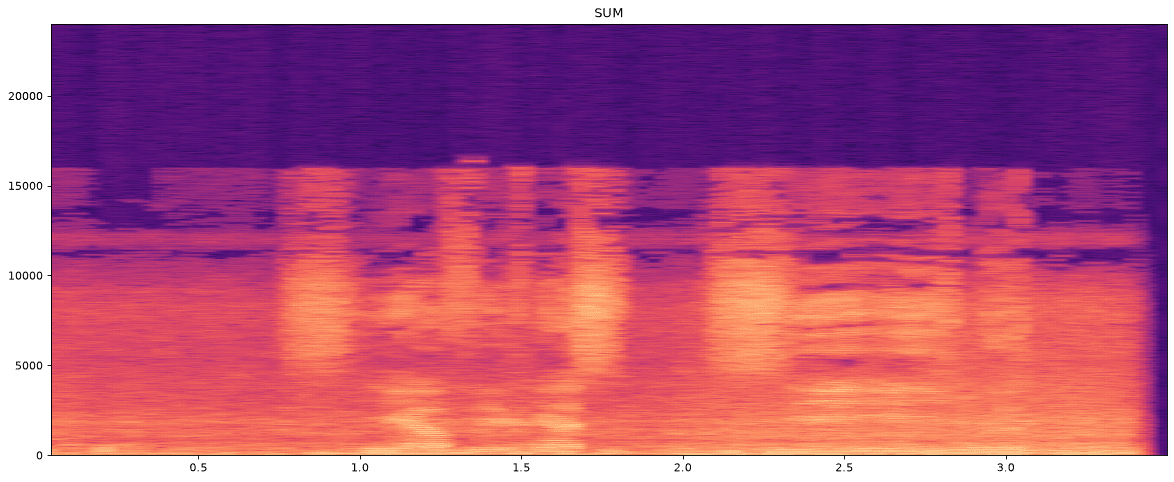
Audio Spectrogram Analysis
Spectrogram Analysis (48 kHz Stereo)

Step 1: Reversing the audio to get the voice key

We reverse the stereo PCM audio array in Python:

[ INPUT: PYTHON AUDIO REVERSAL ]
import scipy.io.wavfile as wav
rate, data = wav.read("memory.wav")
wav.write("reversed.wav", rate, data[::-1])
[ TRANSCRIBED SPOKEN AUDIO ]“The key is sacrifice.”
[ Decryption key ]The spoken phrase gives the XOR decryption key: sacrifice.

Step 2: Carving trailing hex data from the WAV file

Next, we check the WAV header size against the actual file size:

[ WAV HEADER CALCULATION ]Offset 4-8 (Little Endian integer): 682,054 bytes
Expected File Length = 682,054 + 8 = 682,062 bytes
Actual File Size on Disk = 682,275 bytes
Trailing Bytes = 682,275 - 682,062 = 213 bytes appended
[ EXTRACTED 213 BYTES FROM OFFSET 682,062 ]21 04 0e 17 04 04 0c 11 45 04 09 1a 52 20 46 1b 06 08 12 08 0d 17 0d 48 63 2d 0a 07 41 05 1d 1b...

Step 3: Repeating XOR decryption

[ INPUT: REPEATING XOR CIPHER DECRYPTION ]
cipher = bytes.fromhex(hex_str)
key = b"sacrifice"
plaintext = bytes([c ^ key[i % len(key)] for i, c in enumerate(cipher)]).decode()
print(plaintext)
[ DECRYPTED MESSAGE ]Remember why I remained.
Not for the Stone, but for what held me to it.
[ Flag derivation ]The decrypted text says:
“Remember why I remained. Not for the Stone, but for what held me to it.”

Following the hint to reverse what held him to it: reversing "what held me to it" gives ti_ot_em_dleh_tahw.

Accepted flag: OWASP{ti_ot_em_dleh_tahw} (alternate: OWASP{sacrifice}).
[ Show Standalone Python Audio Reverser & XOR Decryptor ]▼
import scipy.io.wavfile as wavfile
import struct

# 1. TIME-REVERSAL AUDIO RECONSTRUCTION
rate, samples = wavfile.read("memory.wav")
reversed_samples = samples[::-1]
wavfile.write("reversed_memory.wav", rate, reversed_samples)
print("[+] Reversed audio exported. Speech transcription reveals: 'The key is sacrifice.'")

# 2. CARVE TRAILING RIFF SLACK SPACE
with open("memory.wav", "rb") as f:
    raw_content = f.read()

# Offset 4 holds little-endian 32-bit chunk size:
riff_chunk_size = struct.unpack("<I", raw_content[4:8])[0]
expected_eof = riff_chunk_size + 8

print(f"[+] Expected Container EOF: {expected_eof}, Physical File Size: {len(raw_content)}")
trailing_hex = raw_content[expected_eof:].decode("ascii").strip()

# 3. REPEATED-KEY XOR DECRYPTION
cipher_bytes = bytes.fromhex(trailing_hex)
key = b"sacrifice"

decrypted_message = bytes([b ^ key[i % len(key)] for i, b in enumerate(cipher_bytes)]).decode()
print("\n[+] Decrypted Keeper Message:\n", decrypted_message)

# Output:
# Remember why I remained.
# Not for the Stone, but for what held me to it.
RECOVERED RELIC / VERIFIED FLAGSOWASP{ti_ot_em_dleh_tahw}Alternate Flag: OWASP{sacrifice}